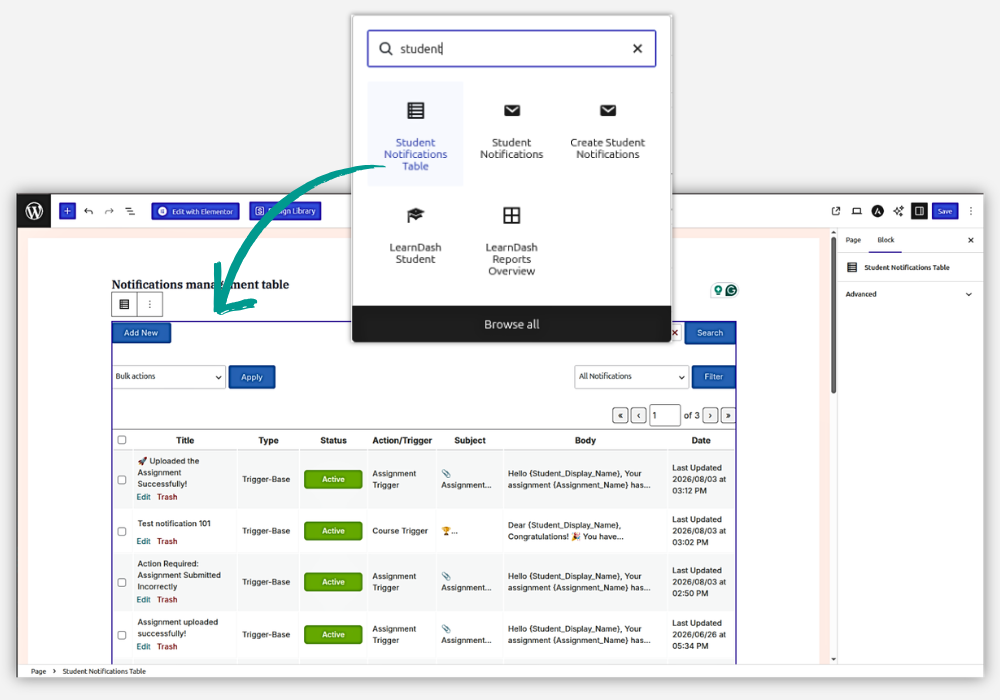
The Student Notifications feature provides three dedicated Gutenberg blocks that can be used to create pages for creating, managing, and viewing student notifications.
Available Blocks
- Student Notification Creation Page — Allows admins and group leaders to create student notifications directly from the frontend.
- Student Notification Management Page — Provides a centralized interface to manage student-related notifications and actions.
- Student All Notifications — Displays all student notifications in one place for easy access and viewing.
How to Use Blocks
To create a page, go to WordPress Dashboard → Pages → Add New and enter a suitable page title. Click the + (Add Block) button and search for the required Student Notification block. Select the block and then publish the page. Lastly, set up this page in the Student Notification Settings page.
Example: Student Notification Creation Page
If you want to create a page where admins or group leaders can create notifications:
- Create a page named Create Student Notification.
- Click + (Add Block).
- Search for Student Notification Creation Page.
- Select and add the block.
- Click Publish.
The published page will provide the notification creation interface on the frontend.