
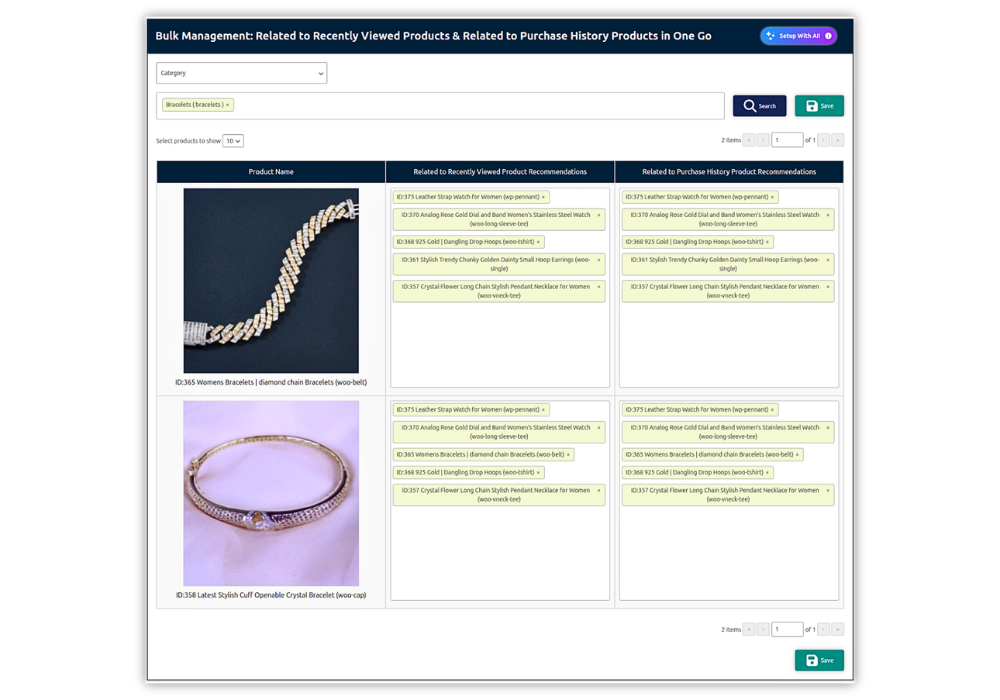
The Bulk Management page allows administrators to review and edit product recommendations generated through the plugin’s AI recommendation feature.
Instead of opening each WooCommerce product individually, administrators can manage recommendations for multiple products from one centralized page.
The following recommendation columns are editable:
- Related to Recently Viewed Product Recommendations
- Related to Purchase History Product Recommendations
Accessing the Bulk Management Page
Navigate to:
WordPress Dashboard → Product Recommendations Pro → Manage AI Recommendations
The page displays WooCommerce products in a table. Each row represents one product and includes:
- Product image
- Product ID
- Product name
- Recommendations related to recently viewed products
- Recommendations related to purchase history
Filtering Products
The filter section at the top of the page allows administrators to find and display specific products before editing their recommendations.
The following filter options are available:
- Category
- Tags
- SKU
- Product Name
How to Filter Products
- Open the Select Filter dropdown.
- Choose Category, Tags, SKU, or Product Name.
- Use the next field to select the required filter values.
- Multiple values can be selected where supported.
- Click Search.
- The matching products will be displayed in the table.
For example, when Category is selected, the next field lists all product categories. After selecting a category and clicking Search, all products assigned to that category are displayed.
How to Edit Recommendations
- Locate the product you want to update.
- Click inside the required recommendation field.
- Enter a product name in the search field.
- Select one or more products from the search results.
- To remove an existing recommendation, click the “×” icon beside the selected product.
- Repeat these steps for any additional products or recommendation columns.
- Click Save to store all changes.
The saved recommendations will be used by the corresponding recently viewed and purchase-history recommendation features.