






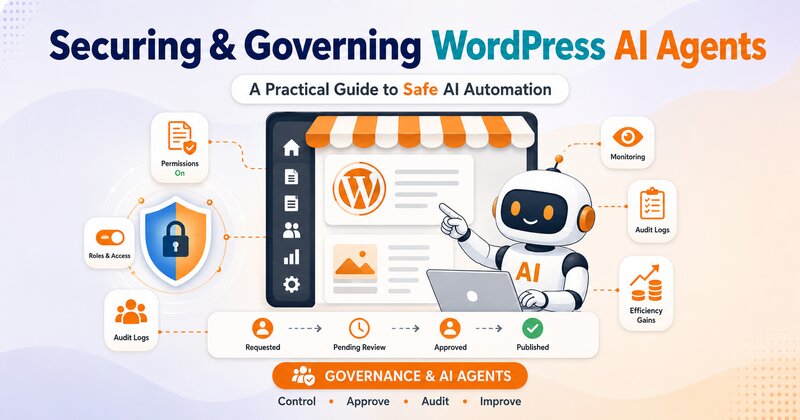
Running a WordPress site was just a matter of maintaining your plugins and themes and sometimes even the odd update before. In 2026, it means something bigger: deciding how much autonomy to hand an AI agent that can log in, read your data, and take action on your behalf.
Content agents draft and publish posts.
Security agents scan for vulnerabilities.
Support agents answer tickets and update order statuses.
Some of these agents never wait for a human to click “approve.”
That shift is not hypothetical anymore. WordPress 6.9 shipped the Abilities API, and the official MCP Adapter connects that API to the Model Context Protocol, the open standard that lets tools like Claude, ChatGPT, and Cursor discover what a site can do and then do it.
Every plugin can now become an AI endpoint, letting agents create posts, pull WooCommerce reports, and manage users, all through conversation. That is a genuine leap in productivity. It is also a new category of risk that most WordPress teams have not built controls for yet.
That’s why WordPress AI agent security and WordPress AI governance are becoming synonymous. The most likely victims will be site owners who install agents like a “new plugin” without giving them careful consideration.
What is actually happening, where the exposure is coming from and what a workable governance approach looks like.
WordPress Was Built for Humans Clicking Buttons, Not Agents Executing Tasks

WordPress security in the past has been primarily about securing a login form, tightening file permissions and fixing known vulnerabilities in plugins. Any action performed on the site (posting, setting changes, user additions, etc.) was performed by a person’s clicking of something within the dashboard.
AI agents for WordPress break that assumption. The Abilities API defines what actions exist on a site, while MCP defines how AI tools discover and execute those actions, and on connected setups, permissions are inherited from the logged-in WordPress user and can be managed or revoked at any time. That translates to an agent with an administrator account being able to perform whatever an administrator can do – without the pauses, second guessing, or “wait, should I actually do this?”.
That is not a flaw in the Abilities API itself. The MCP Adapter respects the permission checks defined in the Abilities API, so agents can only perform actions a user is already authorized to do. The risk sits one layer up, in how site owners configure that authorization in the first place. WordPress gave the ecosystem a standardized, well-designed door. Whether that door opens onto a broom closet or the entire building depends entirely on the access you grant.
WordPress Abilities API Security: What It and the MCP Adapter Actually Do

It’s a good idea to keep the two pieces apart since they solve different problems.
- The Abilities API is a WordPress core feature that is a registry of what a plugin, theme, and core can do, in a structured machine-readable format: what parameters it accepts and what it returns; who is able to run it.
- The MCP Adapter exposes that registry to external AI tools via the Model Context Protocol, allowing them to discover available actions at runtime, rather than having to build one-off integrations for each application.
- Write abilities respect existing WordPress capabilities. Creating a post through an agent still requires the publish_posts capability, and editing still checks per-post permissions, so the MCP user needs the appropriate WordPress role.
None of this is inherently unsafe. It is closer to giving your site a well-documented API instead of forcing every integration to scrape the dashboard.
The problem is that a well-documented API is only as safe as the account behind it, and most WordPress installs were never designed with the assumption that an external, non-human actor would be making authenticated requests continually.
MCP WordPress Security Risks: The New Attack Surface

Security researchers watching this space are not being alarmist for the sake of it. The concerns are specific and mostly boil down to how permissions, credentials, and monitoring are set up around an agent, not the underlying protocol.
- Over-provisioned agents: An agent with full admin privileges can create users, install plugins and delete content even if their actual job is to write meta descriptions. With the advent of AI on WordPress, it is important to learn how to set up AI servers without compromising site security, secure authentication tokens and passwords, and protect wp-config.php from unauthorized access.
- A patching gap that agents can’t fix on their own: According to Patchstack’s 2026 State of WordPress Security report, the median time to mass exploitation for high-impact vulnerabilities is just five hours, and 46% of plugin vulnerabilities don’t have a patch available by the time they’re publicly disclosed. Plugin vulnerabilities in the ecosystem rose 42% year over year, with 91% of all disclosed vulnerabilities found in plugins rather than core, and highly exploitable vulnerabilities up 113% year on year. A security agent watching for known CVEs is only useful if the underlying vulnerability has already been catalogued somewhere.
- Shadow AI usage: This is not unique to WordPress, but it applies directly. Teams frequently deploy AI agents before IT or security functions are looped in, and organizations report AI tools being trialled without formal review. On a WordPress site, that can mean an editor connects a personal AI assistant to the dashboard using their own login, with nobody else on the team aware it has write access.
- Shared credentials undermine the access model on paper: Even where governance policies technically exist, actual implementation often relies on shared accounts and personal credentials to bypass approval friction, which quietly defeats role-based permission structures.
None of these are theoretical. Incident responders are already treating this as an operational reality, not a future concern. AI agents have already been used to audit a fleet of sites and catch a second compromised site during a live breach investigation, which cuts both ways: the same speed and access that make agents risky also make them useful for defense, when they’re the ones you deployed on purpose.
Need help securing your AI-powered WordPress site?
Talk to our WordPress experts today!Least Privilege for WordPress AI Agents Is the First and Most Important Control

If there is one governance principle that matters more than any other for WordPress AI agents, it is this: an agent should only ever be able to do the specific job it was built for, nothing more.
For teams working with a WordPress plugin developer, it also means that instead of handling AI agent permissions as a standalone automation issue, you consider them as a component of your site’s general access-control approach.
How to implement that in a WordPress site:
- Create a dedicated role per agent, scoped to only the WordPress capabilities that agent actually needs. A content-drafting agent does not need manage_options or edit_users.
- Start read-only wherever possible. Even WordPress’s own developer documentation recommends this posture. The official guidance is to start small, begin with read-only abilities, and be prepared to hit roadblocks, which is a strong signal that this is genuinely new, unfinished territory, not a solved problem with a simple setup wizard.
- Use per-agent application passwords or OAuth connections, never a shared admin login. A shared login makes it impossible to tell which agent, or which human, took a given action. Adding two-factor authentication for WordPress accounts can provide another layer of protection for the human accounts used to authorize these connections.
- Disable unused abilities individually. In most cases, plugins for the Abilities API allow for an agent to enable or disable specific abilities at a time from the settings screen, instead of having to accept it as a whole.
- Treat every write-capable ability like a new admin-level plugin install, subject to the same security review you’d apply when evaluating WordPress security plugins or as you would give a human contractor access to the dashboard.
- Re-review agent permissions on a schedule, not just at setup. An agent’s scope tends to expand quietly over time as teams add “just one more” capability to save a manual step.
Monitoring and Audit Trails: Knowing Exactly What Your Agents Did

In case something goes wrong, the blast radius will be limited by least privilege. An additional level of visibility can be achieved through WordPress activity log plugins, which can track changes and activity throughout the site. Monitoring is what tells you something went wrong in the first place, and lets you prove what happened afterward.
A working governance setup should let a site owner answer three questions at any time, for any agent connected to the site:
- Who used it, and when? Every agent connection should map back to an individual human account, not a generic “AI” or “automation” login.
- What did they ask the agent to do? The prompt or instruction that triggered an action matters as much as the action itself when something needs to be traced back.
- What did the agent actually execute? Logged actions, not just logged intentions, since agents can and do interpret instructions differently than a human expects.
This is the gap that separates surface-level compliance from real governance.
Full AI governance at the execution layer involves more than just knowing what AI agents did; it also includes knowing who within your company used them, when, and what they were tasked with doing. This way you can track and stop a blog post from being posted that is wrong or someone trying to get into your blog without permission.
If it wasn’t for that layer, an agent who’s been quietly going too far with his powers can quietly do his stuff for weeks without anyone realising!
Building a Practical Governance Framework Without Slowing Everything Down
Governance does not have to mean a six-month policy document before anyone is allowed to touch an AI tool. In custom WordPress development, governance must be taken into account along with the custom functionality, integrations, user roles, and business workflows of the site. A workable framework covers five things:
- Inventory every agent connected to the site, including ones added informally by individual team members, since undocumented connections are the most common source of shadow AI risk.
- Assign an owner to each agent, someone accountable for what it’s allowed to do and who reviews its activity periodically.
- Map each agent’s permissions to its actual job, and remove anything broader than that job requires.
- Centralize logging so agent activity is visible in one place rather than scattered across plugin-specific dashboards that nobody checks.
- Define an incident response step specifically for agents, apart from your normal breach procedure, to be able to instantly revoke the agent’s credentials and roll back their last actions if something seems wrong.
This does not need to be built from scratch by every site owner individually. A growing number of WordPress-native tools are being built specifically to layer governance controls, permission scoping, and activity logging on top of the Abilities API and MCP Adapter, rather than leaving site owners to configure raw capability checks by hand.
The Future of AI Agents in WordPress
WordPress agents are not a fleeting thing that will soon disappear. It’s apparent from the platform’s roadmap that the Abilities API is now a core piece of infrastructure with the ecosystem of provider plugins, connectors, and role-based agents atop that platform becoming even more capable.
That means the security and governance conversation will not stay optional for long. Sites that treat agent access with the same discipline as admin account access, least privilege by default, individual accountability, and real audit trails, will be the ones that get to keep using this new capability without a painful incident forcing the issue.
Sites that connect agents the way they’d install a free plugin, quickly and without a second thought, are the ones most likely to end up as a cautionary example.
The goal is not to slow down the adoption of AI. It is to ensure that if someone acts on your site, they can get a response back at a second’s notice with “who gave you permission to do this and why?”.
Frequently Asked Questions
How is the MCP Adapter different from the Abilities API?
The Abilities API is the set of abilities that a site is able to perform. The MCP Adapter is another layer that makes those registered abilities accessible via the Model Context Protocol, which can be found and used by other AI tools such as Claude, ChatGPT, or Cursor.
Can an AI agent do more than a human user is allowed to do?
No, by design. Write abilities respect existing WordPress capabilities, so an agent connected under a given user account is bound by that account’s role and permissions, the same as if the human were performing the action manually.
What is the biggest security risk with WordPress AI agents?
Over-provisioning is the most common and most preventable risk: connecting an agent under a full administrator account when its actual task only requires a narrow set of permissions, combined with a lack of monitoring to catch it.
Are premium WordPress plugins riskier to connect to AI agents than free ones?
Potentially. Premium plugins tend to receive less independent security review than free, publicly available ones, and a significant share of the vulnerabilities found in them have proven exploitable in real attacks, which matters more once an AI agent can act on that plugin’s functionality automatically.
Will AI agent governance make the use of AI on my WordPress site slower?
Not if constructed from the beginning. The up-front time and effort required for assigning scoped roles, logging activity, and reviewing permissions periodically is minimal, but well worth the time to avoid an incident when an over-permissioned agent is out of sight.