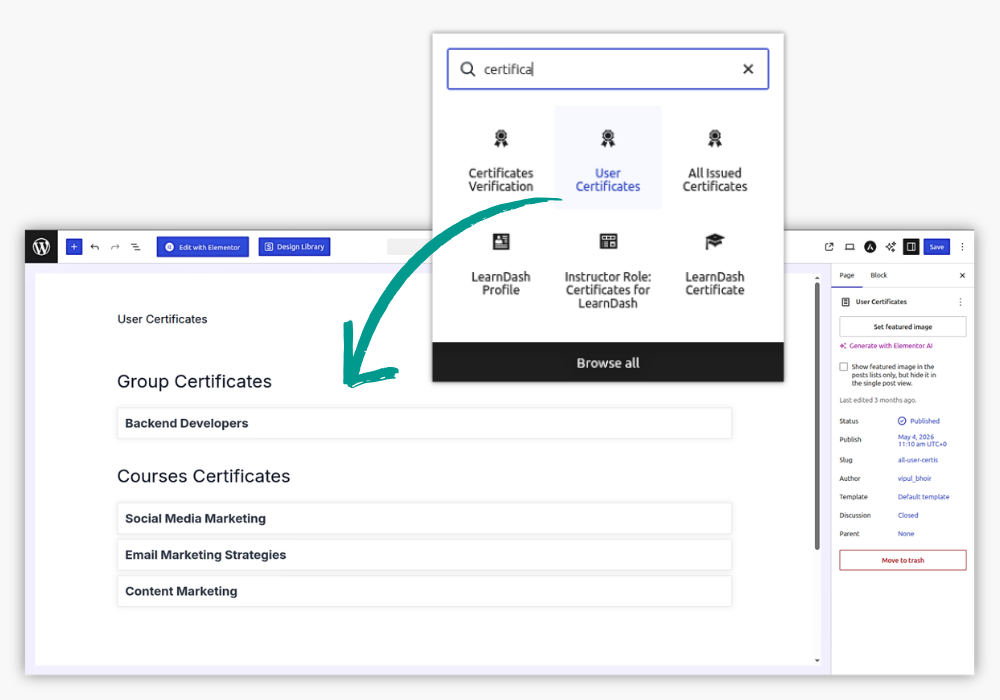
The Multiple Certificates feature provides three dedicated Gutenberg blocks for verifying user certificates, displaying user certificates, and viewing all issued certificates.
Available Blocks
- Certificate Verification — Allows users to quickly verify the authenticity and validity of issued certificates.
- User Certificates — Displays certificates earned by individual users, making them easy to access and view.
- All Issued Certificates — Gives administrators a centralized view of all certificates issued across the LearnDash site.
How to Use Blocks
To create a certificate page, go to WordPress Dashboard → Pages → Add New and enter a suitable page title. Click the + (Add Block) button and search for the required certificate block. Select the block and then publish the page. Then set up this page in the Multiple Certificates settings page ( LearnDash → Settings → Multiple Certificates for LearnDash ).
Example: User Certificates
If you want to create a page where users can view their earned certificates:
- Create a page named User Certificates.
- Click + (Add Block).
- Search for User Certificates.
- Select and add the block.
- Click Publish.
The published page will display the certificates available to the user on the frontend.