
Multiple Certificates Pro for LearnDash
Diverse Achievements, Unique Certificates
Enhance your LearnDash courses with ‘Multiple Certificates Pro for LearnDash’, allowing you to award personalized certificates for different achievements, making learning more engaging and rewarding.
Current Version
2.1.1
WordPress
6.3.1 or Higher
LearnDash
4.8.0 or Higher
PHP
8.1 or Higher
Last Update
17 Aug 2026
Plugin Overview & Features
Picture this: You run an e-learning website, and one of your courses is all about cooking. Now, your students aren’t just learning one recipe; they’re mastering an entire culinary journey. Each chapter in the course represents a unique skill, from baking to grilling, and every skill deserves its own certificate of achievement.
With the default LearnDash setup, it’s like offering just one certificate for your entire cooking course. It’s like saying, “Here’s your diploma for everything you’ve learned, from making soufflés to sizzling stir-fries.”
But in the real world, that doesn’t quite cut it, right? Imagine a culinary school giving just one certificate for all their diverse cooking skills. That’s where “Multiple Certificates Pro for LearnDash” comes in.
Our plugin lets you do something amazing: for each skill your students master, they receive a personalized certificate: for courses, quizzes, groups, and individual lessons. So, when they ace the art of baking, they get a baking certificate. When they become grill masters, they get a grilling certificate.
And those certificates don’t have to disappear into a student’s inbox and be forgotten. They can become digital proof of what the learner has accomplished, complete with ways to identify and verify each achievement. Students can also share their credentials online, turning every certificate into something they can proudly carry beyond the classroom.
With “Multiple Certificates Pro for LearnDash,” you can now create a more engaging and personalized learning experience that keeps your students coming back for more. Tailor your certification process to your learners and watch their enthusiasm and success soar. Elevate your courses, boost engagement, and unlock the potential of personalized certificates with our plugin today!
How Can This Plugin Be Used?
- Mastery in Multi-Stage Courses
- Recognition of Micro-Credentials
- Corporate Training Recognition
- Quizzes-Based Certification
- Share Earned Certificates Online
- Specialized Certifications for Individual Lessons
- Tiered Skill Levels
- Verify Certificates using QR Codes
- Course Bundles with Multiple Achievements
- Automatically Email Certificates
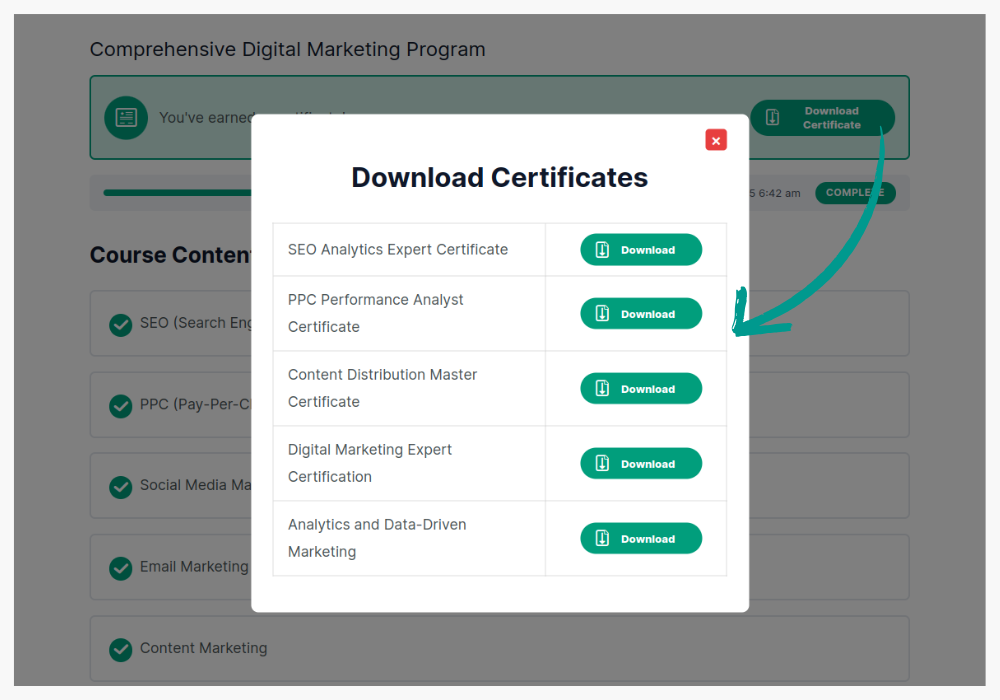
For a course that covers multiple topics, such as a comprehensive digital marketing program, you can issue certificates for each module (e.g., SEO, PPC, social media).
By using this LearnDash certificate plugin, students receive a certificate for each skill, keeping them motivated throughout the course.
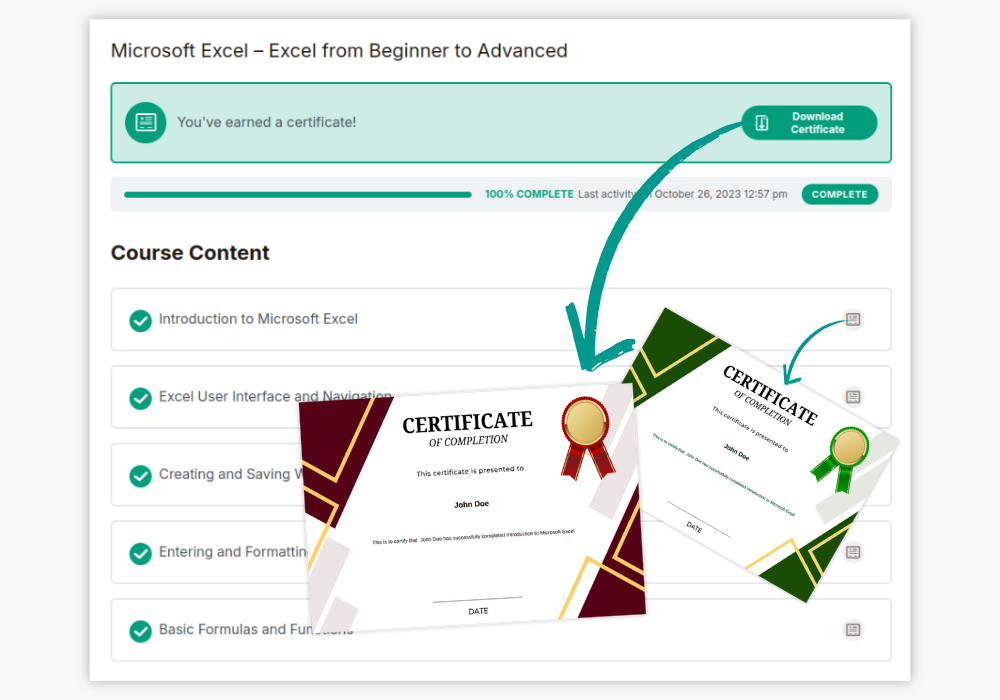
Micro-credentialing is increasingly popular, where learners earn credentials for specific skills or short courses. With the plugin, you can easily issue LearnDash certificates for each micro-course, building a comprehensive certification portfolio for students.

Incorporate multiple certificates for a company’s internal training program. Employees completing individual training topics, like workplace safety or leadership, can receive multiple certificates using the LearnDash certificate plugin, giving them a clear record of their progress in different areas of expertise.
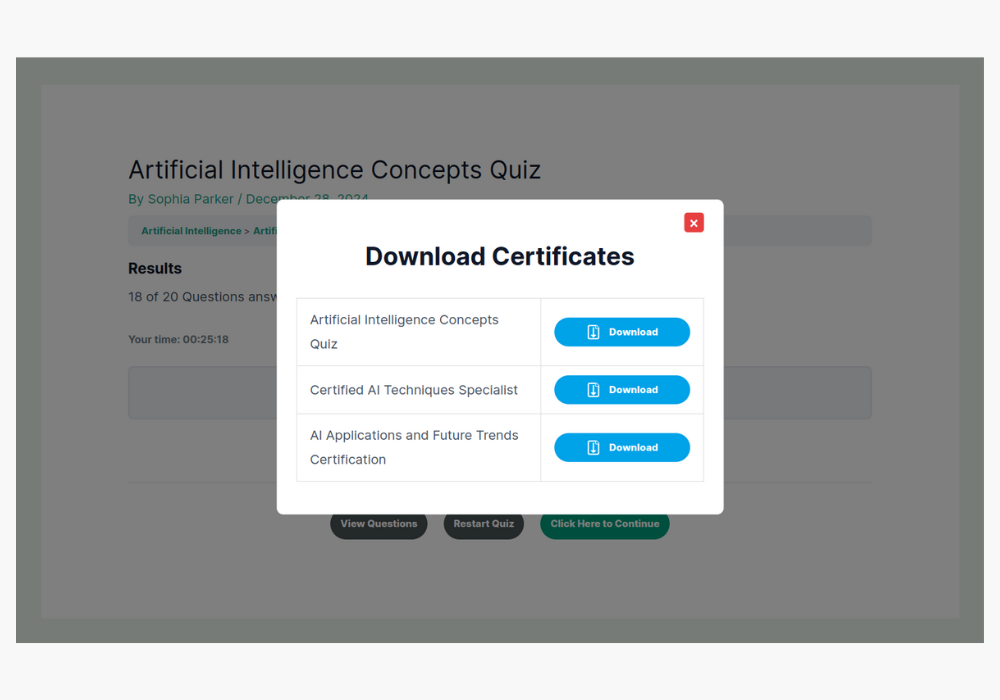
For courses that feature various quizzes, like IT certification courses, you can set up certificates for passing each quiz. The plugin allows you to automatically email certificates after quiz completion, enhancing the use of LearnDash email certificate features.
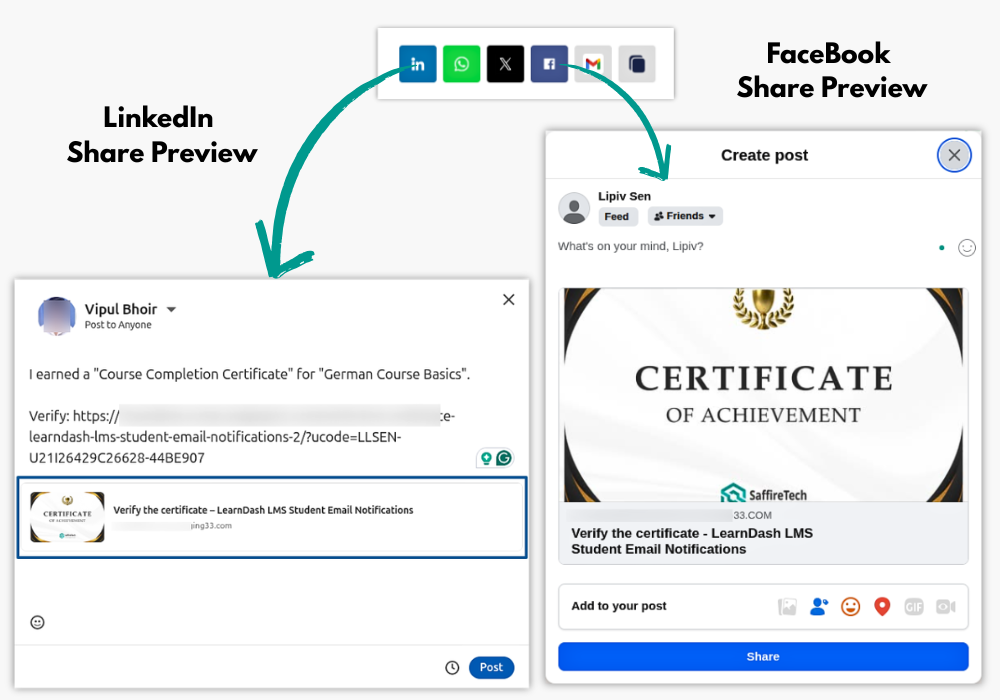
Students can share their achievements and showcase their achievements professionally with verified certificate links across popular platforms such as LinkedIn, Facebook, Twitter/X, Whatsapp and Gmail. Viewers can verify the certificate using the link through the verification page.
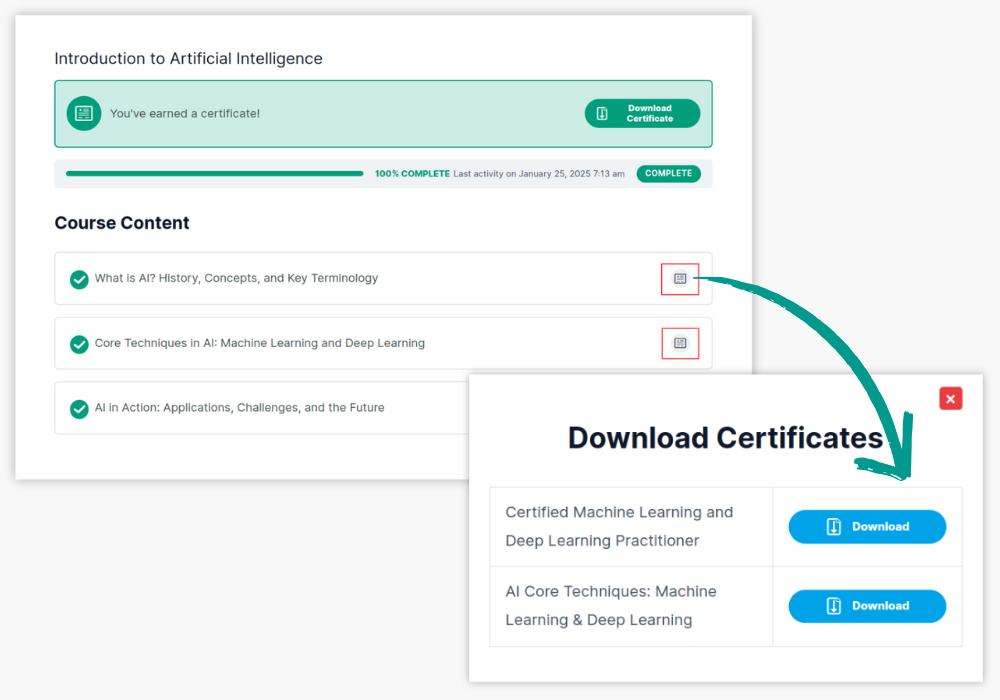
In cases where specific lessons warrant their own recognition, such as CPR training within a larger health and safety course, students can earn multiple LearnDash certificates as they complete each lesson, providing acknowledgment for mastering essential skills.
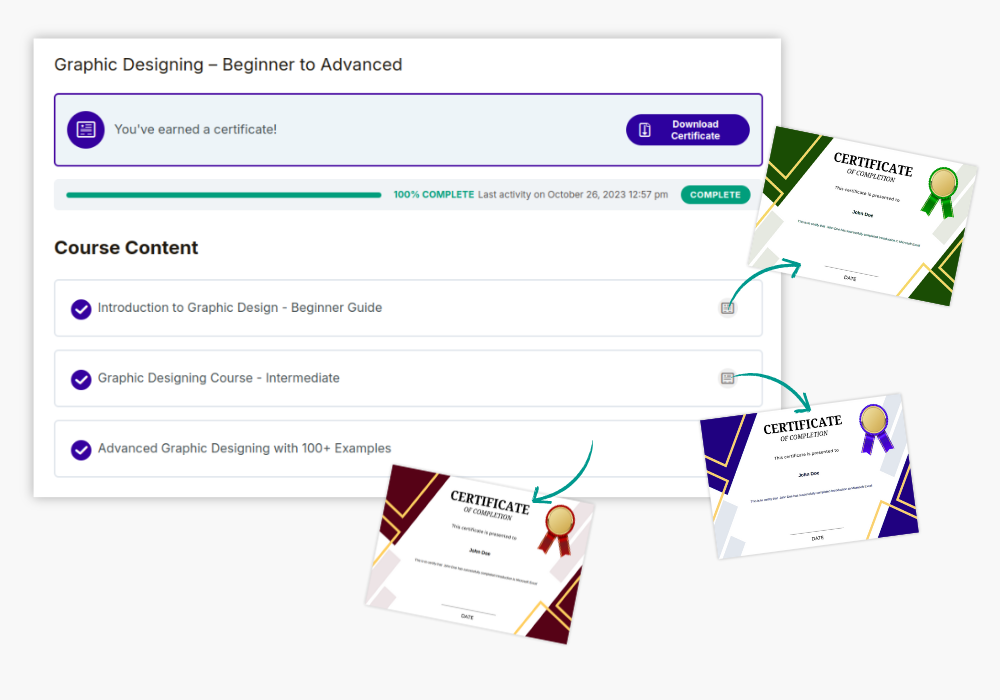
For a course with tiered skill levels, like beginner, intermediate, and advanced graphic design, you can issue a LearnDash certificate at each level. Students who progress from one level to the next will receive personalized certificates for each achievement.
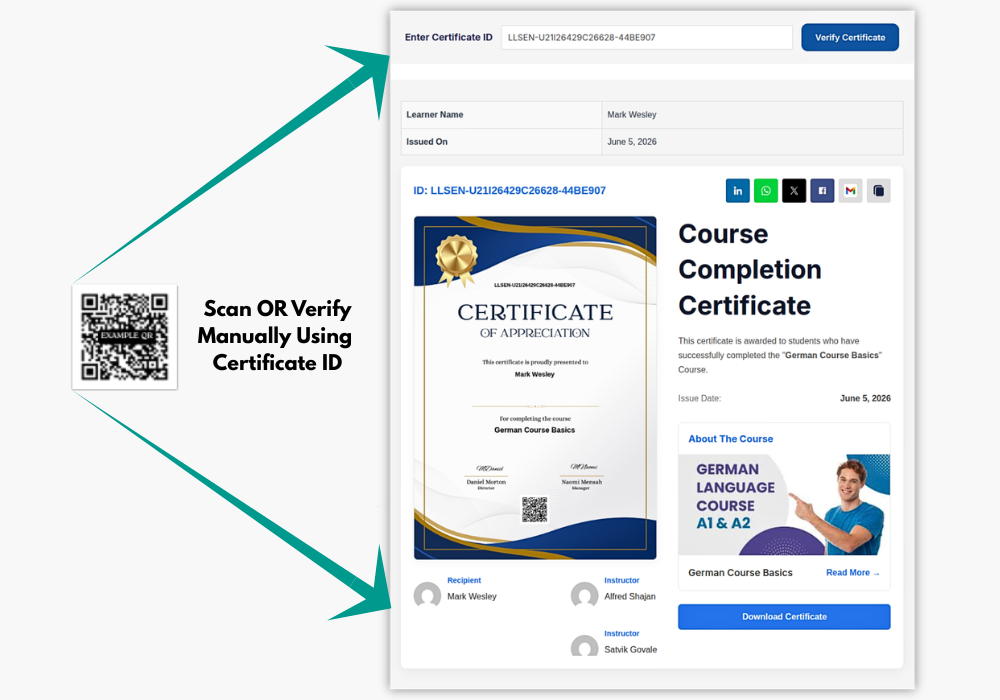
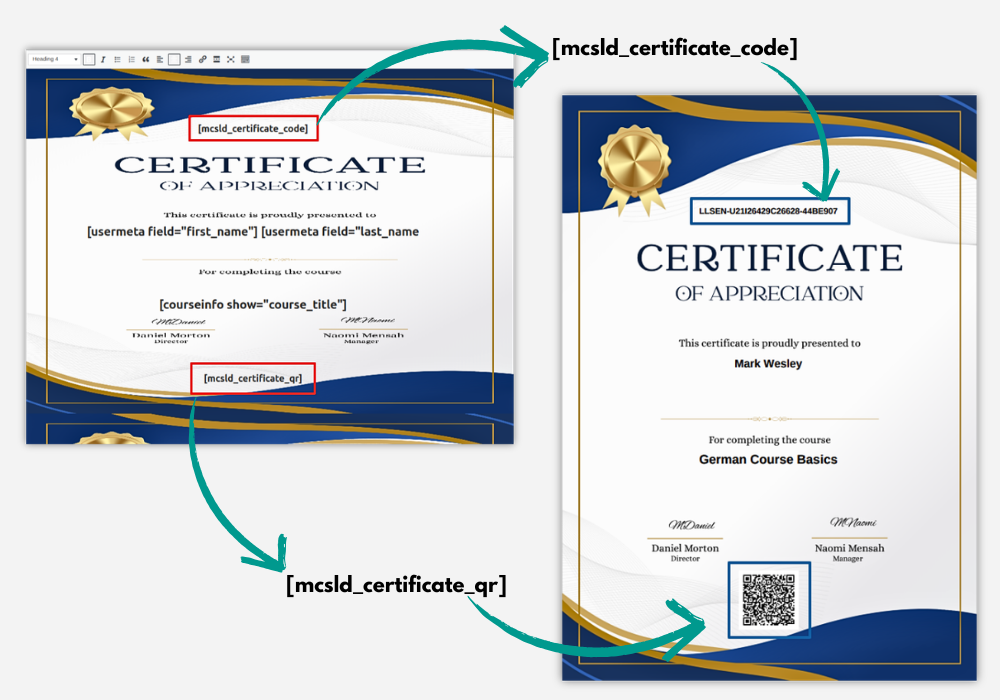
Make LearnDash certificates more professional, traceable, and easy to verify with built-in Certificate ID and QR Code support. Each issued certificate can include a unique Certificate ID and a scannable QR code, allowing learners, employers, and organizations to verify certificate authenticity online.
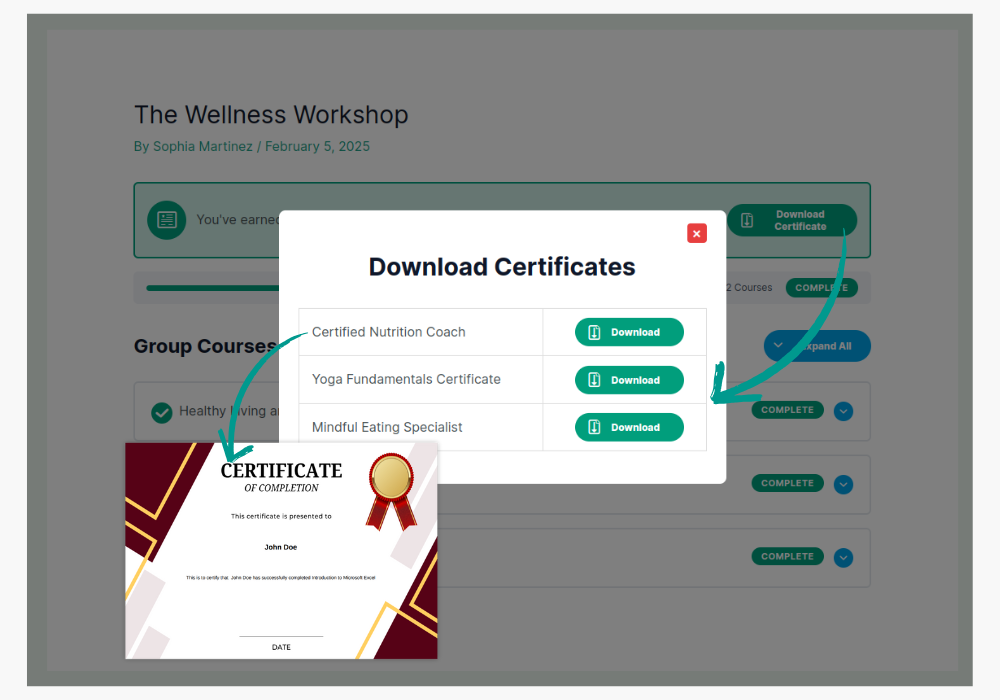
For bundled courses like a fitness program combining nutrition, strength training, and cardio, issue separate certificates through the LearnDash certificate plugin for each aspect of the program. Students receive recognition for every element they master within the course bundle.
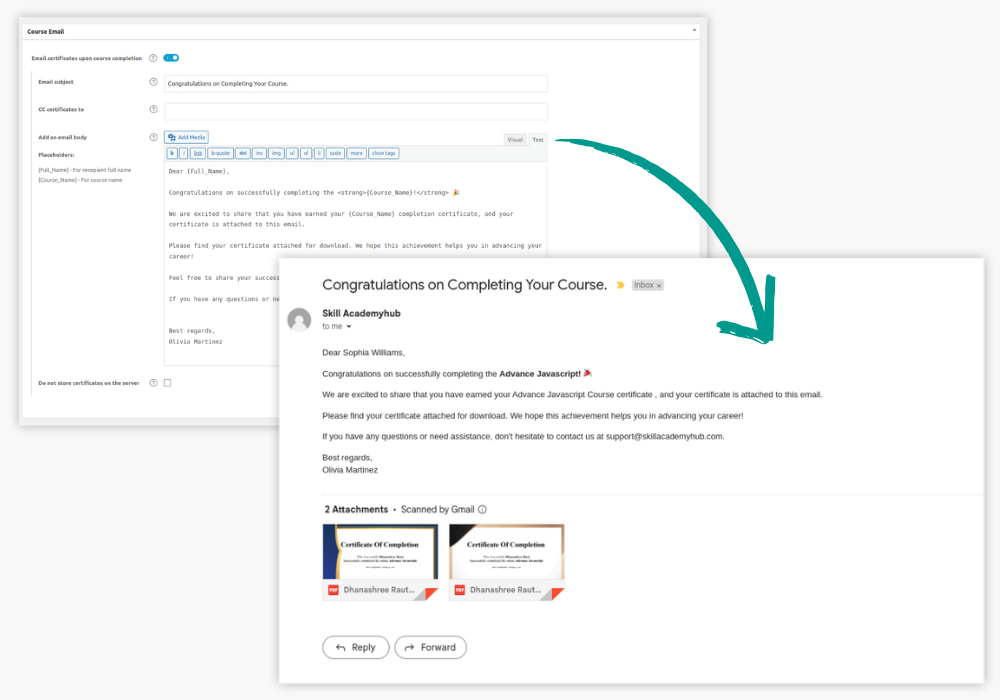
When students complete a course or quiz, the plugin integrates with LearnDash email certificate functionality, ensuring certificates are sent directly to the student’s inbox. This is useful for remote learners who need immediate access to their certifications for career or academic progression.
Key Plugin Features
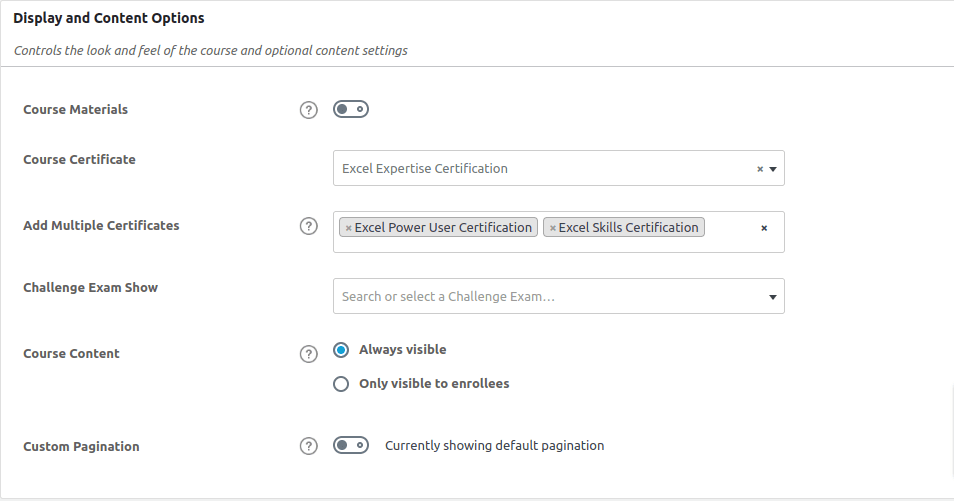
Easily Set Multiple Certificates for Courses, Quizzes and Groups
Simplify certification management. Add and assign multiple certificates to Courses and Quizzes effortlessly, all from the convenient backend of your system. You can not only streamline certificate assignment for individual achievements but also create and manage group certificates with ease.
NEW
Certificate ID & QR Code for Easy Verification
Make LearnDash certificates more professional and easier to verify with built-in Certificate ID and QR Code support. Each certificate can include a unique Certificate ID and a scannable QR code linked to the verification page, allowing learners, employers, and organizations to quickly confirm certificate authenticity. You can also customize the certificate ID prefix and choose where the ID and QR code appear within the certificate layout. The feature works with Course, Group, Quiz, and Lesson certificates.
Issue Multiple Certificates on LearnDash Lessons!
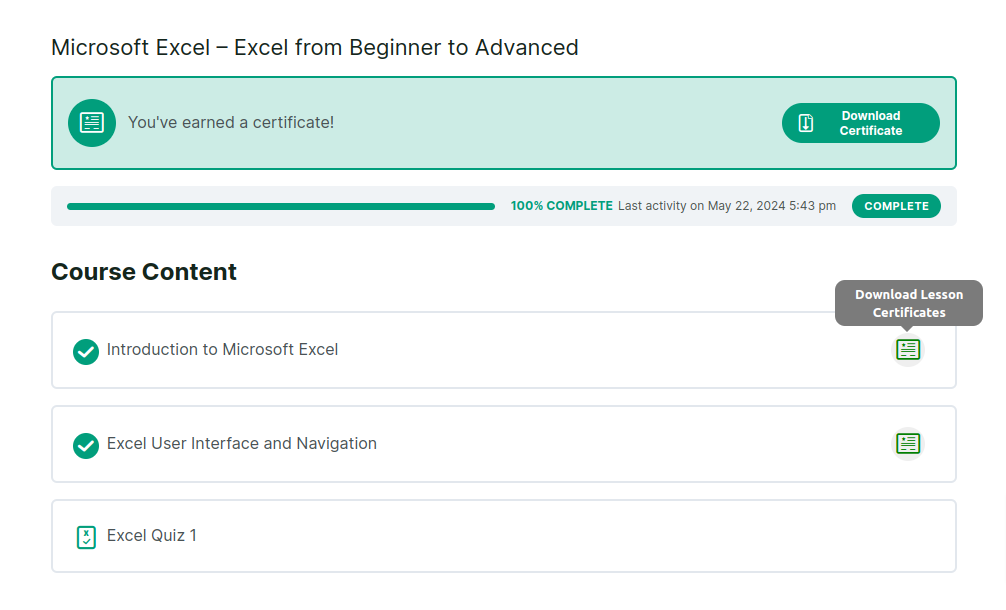
Now, you can award certificates for individual LearnDash lessons—multiple certificates for multiple lessons! Have 5 lessons and want to give a certificate for each? Or want to award 2 certificates for a single lesson? Eitherway, we’ve got you covered!
NEW
Manage All Issued Certificates in One Place!
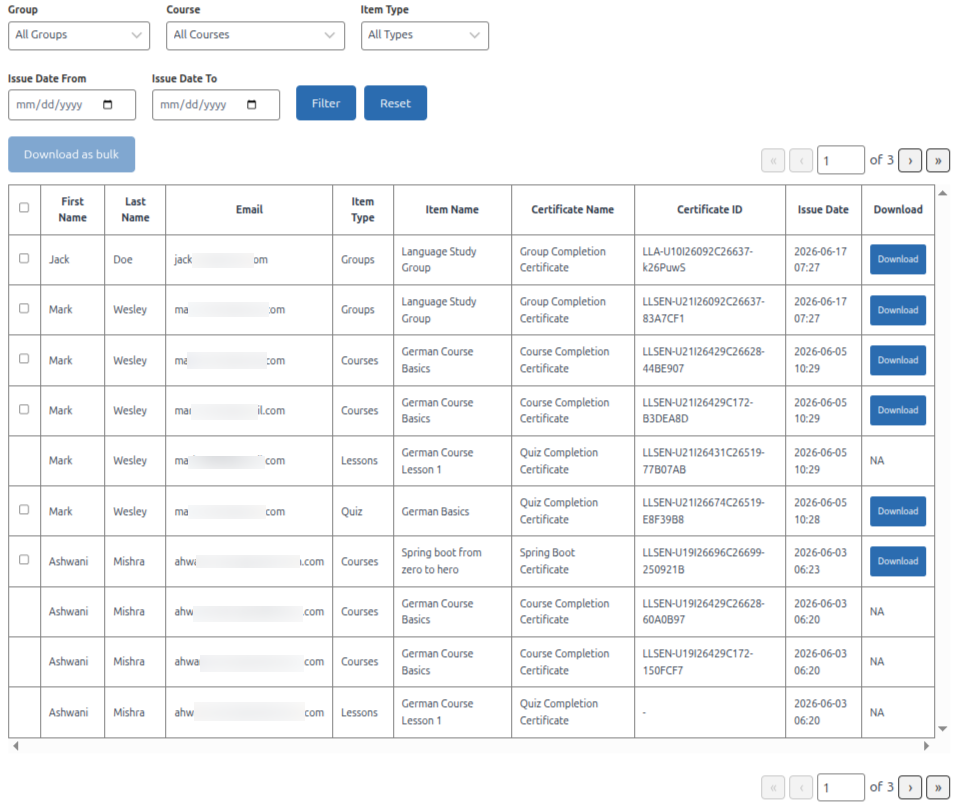
Keep your certificate management simple with a centralized dashboard for all issued certificates. Easily view, filter, and download certificates by type, course, group, or issue date. Admins and Group Leaders can quickly access the certificates relevant to them, while recipient details, bulk downloads, and pagination make managing large numbers of certificates effortless.
Show All LearnDash Certificates in One Place!
Easily showcase all earned LearnDash certificates. using the [mcsld_user_certificates] shortcode.
Allow your students to easily view all LearnDash certificates awarded on Group Level, Course Level, Quiz Level and Lesson level from a single page!
Certificates are neatly categorized, making it effortless to track accomplishments and download them when needed. A streamlined way to keep learning milestones organized and accessible!
Automatically Email certificates upon Course, Quiz, Group, and Lesson completion!
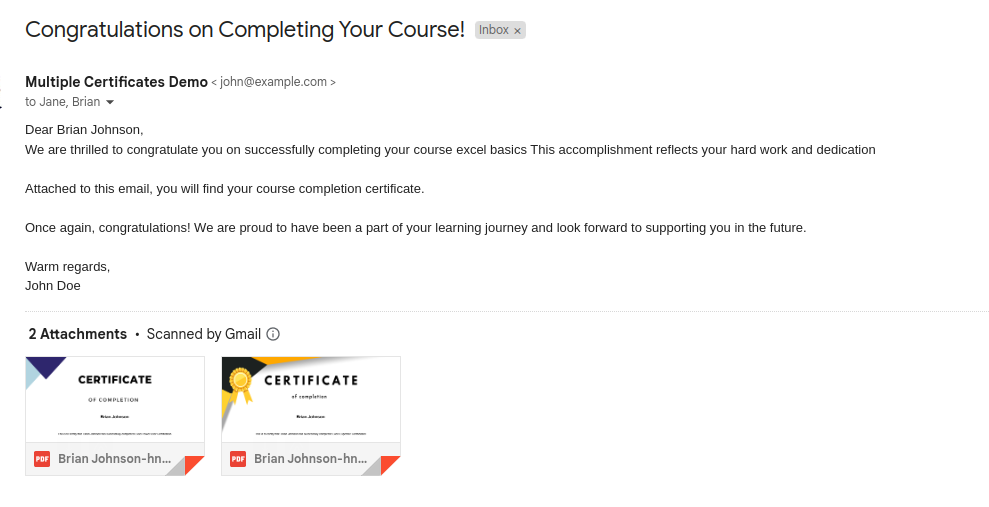
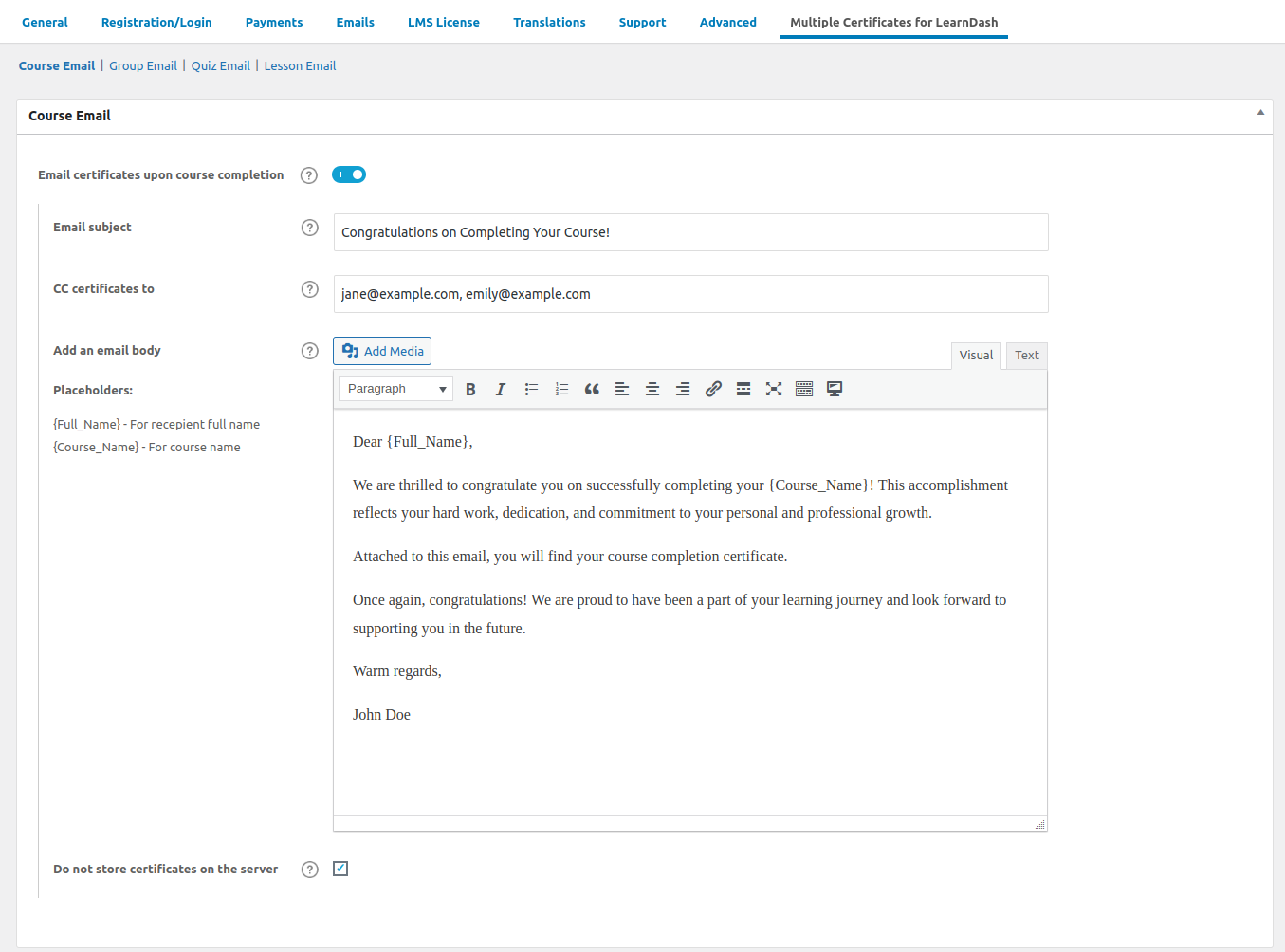
You can enable emails that are sent automatically to the students with the certificates earned by them for every course, quiz, group, and/or lesson completion. These certificates are also saved to the server by default but also come with an option to turn off saving if you wish to.

Instant Certificate Previews – See It Before You Award It!
With the new Certificate Preview feature, you can now preview LearnDash certificates before issuing them. Choose “Preview with Placeholders” to see how shortcodes will appear dynamically, or “Preview with Sample Values” to visualize a certificate with sample data. This makes designing and verifying certificates easier, ensuring a polished final version before students receive them!
Configure and Personalize Automatic Emails Quickly
You now have the complete control over everything related to automatic emails with certificates that are sent on course, quiz, group and/or lesson completion. You can configure email subject, CC certificates, email body and also personalize these emails using placeholders like {full_name}, {course_name}, {quiz_name}, {group_name}, {lesson_name}!
Seamless Integration with LearnDash’s Certificate Builder
Multiple Certificates Pro is now fully compatible with the LearnDash LMS – Certificate Builder add-on, allowing users to effortlessly design stunning certificates using a visual, drag-and-drop interface, making the creation process smoother, faster, and more intuitive than ever.
NEW
LearnDash Instructor Role Plugin Compatibility
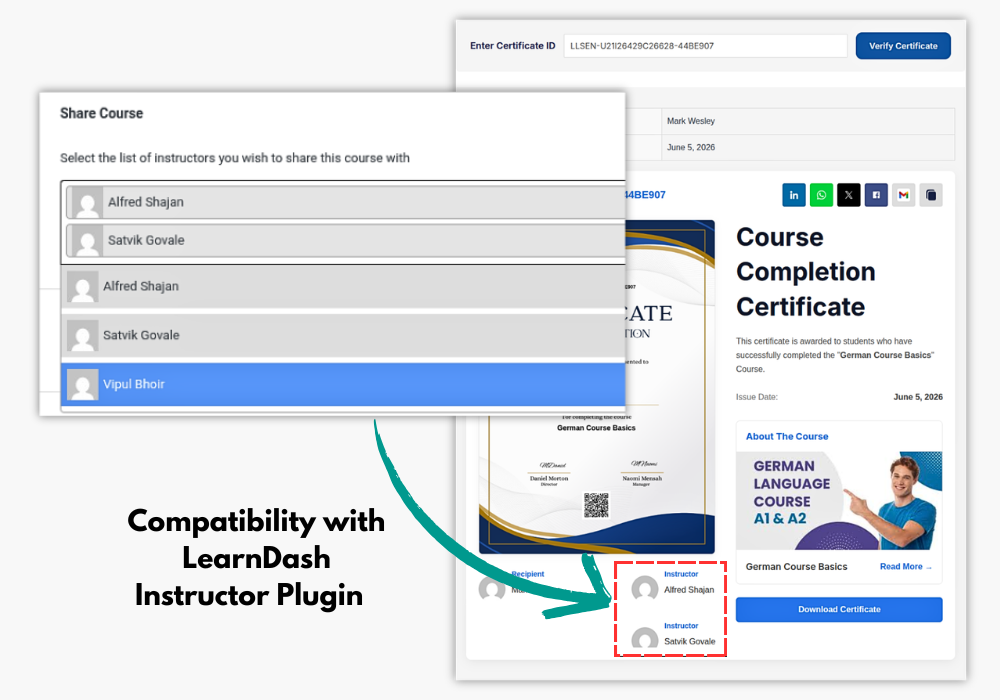
Compatible with the LearnDash Instructor Role plugin, allowing instructors assigned to a course to be displayed on the certificate verification page when the certificate is a Course Completion Certificate. The certificate verification page shows the assigned instructor(s) alongside the course recipient’s information
Seamless Integration – Certificates & Notifications, Perfectly Synced!
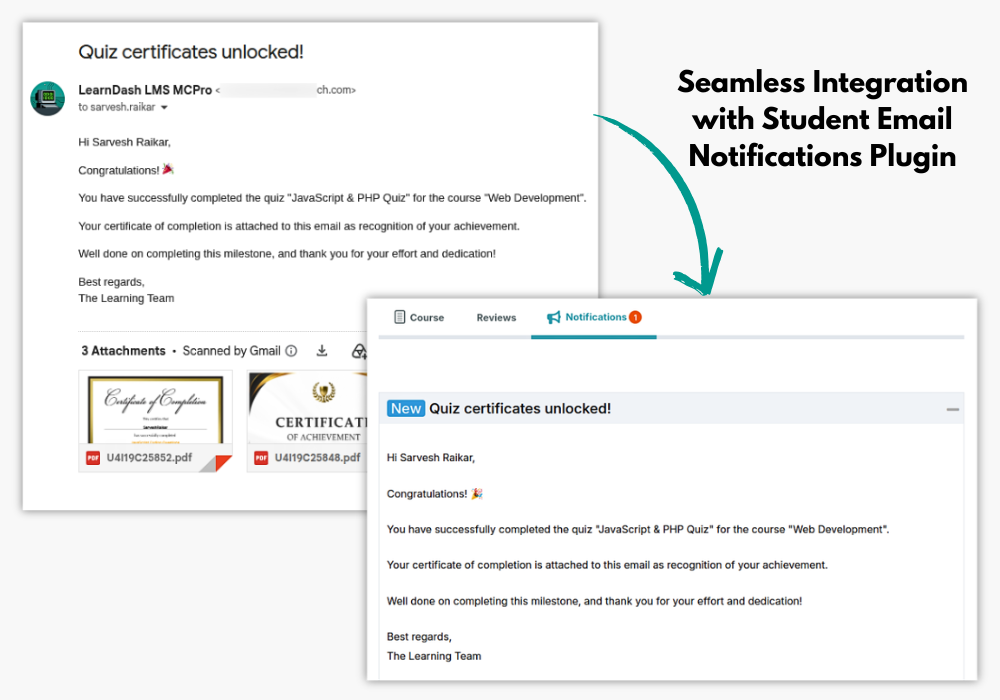
Multiple Certificates Pro for LearnDash now works effortlessly with Student Email Notifications for LearnDash! Automatically notify students when they earn a new certificate, ensuring they never miss an achievement.
NEW
Professional Certificate Sharing & Online Verification
Give learners an easy way to share their achievements while keeping certificates verifiable. The plugin provides a dedicated verification page where certificates can be checked using a certificate code or QR link, with options to display certificate details, a visual preview, and a PDF download. Learners can also share verified certificates through LinkedIn, Facebook, Twitter/X, WhatsApp, Gmail, or by copying the certificate link. Admins can customize verification page templates, certificate prefixes, and social sharing details such as the meta title, description, and image for a more professional, branded experience.
How Can You Benefit From Multiple Certificates Pro
1 Enhanced Learner Motivation
Providing personalized LearnDash certificates for each milestone or skill mastered keeps learners motivated throughout the course.
Instead of waiting until the end of a long program, they receive recognition for their efforts at every step, boosting their enthusiasm and encouraging engagement.
2 Email Certificates Automatically
Automatically send certificates to learners upon course, quiz, lesson, or group completion using the LearnDash certificate plugin feature.
This automation ensures students receive instant recognition without manual follow-ups, creating a seamless learning experience.
3 Recognition for Milestones
Issue certificates not only at the end of a course but also for key milestones such as individual lessons, quizzes, or modules.
This flexibility, provided by the LearnDash certificate plugin, allows learners to track their progress and feel a sense of achievement, enhancing retention and course completion rates.
4 Flexible Certification Options
With the ability to assign LearnDash multiple certificates for different components like courses, quizzes, or lessons, the LearnDash certificate plugin enables you to tailor the certification process to suit various learning paths, assessments, or specific skills being taught. This creates a more customized learning experience.
5 Streamlined Certification Process
Save time by managing multiple certificates from the backend. The plugin allows you to assign, edit, and manage LearnDash certificates in one place, simplifying the certification process for complex courses with multiple assessment points.
6 Tailored Learning Experience
With LearnDash multiple certificates, you can offer a more personalized learning journey. Learners feel they are progressing at their own pace, receiving recognition for their individual achievements, rather than relying on a one-size-fits-all approach.
7 Group Certificates
For group-based courses or corporate training sessions, the LearnDash certificate plugin allows awarding of LearnDash certificate to entire groups. This feature is perfect for team-based learning or collaborative efforts where collective achievement is recognized.
8 Customizable Automatic Emails
Personalize every LearnDash email certificate notification with placeholders like the learner’s name, course name, or quiz details. This adds a professional, personal touch that aligns with your brand, making the certificate experience more engaging.
9 Improved Course Appeal
Offering LearnDash multiple certificates through the LearnDash certificate plugin enhances your course’s attractiveness, especially for learners who appreciate frequent recognition for their progress. This positions your courses as highly rewarding and helps them stand out in the competitive e-learning landscape.
10 Simplified Achievement Tracking
Instructors can easily track the progress of learners by reviewing the LearnDash certificates they’ve earned. This simplifies the process of assessing individual progress, evaluating skill development, and adjusting learning paths if necessary.
Elevate Your e-Learning: Click for a Live Demo of 'Multiple Certificates Pro for LearnDash'
View DemoPricing Plans
Multiple Certificates Pro For LD
$79
$59
Multiple Certificates PRO PLUS
$122
$92
LearnDash Basics Addon Pack
$133
$100
Multiple Certificates Pro For LD
$299
$224
Multiple Certificates PRO PLUS
$499
$374
LearnDash Basics Addon Pack
$549
$449
* All Lifetime Licenses come with 3 Years of Support and Lifetime Updates.

100% Risk-Free Money Back Guarantee!
We guarantee you a complete refund for new purchases if a request is made within 15 Days of purchase
Frequently Asked Questions
What is Multiple Certificates Pro for LearnDash?
Multiple Certificates Pro for LearnDash is a plugin that enhances LearnDash functionality by allowing you to award additional certificates to students along with the primary certificate upon the completion of a course, quiz or group courses.
Why do I need this plugin?
LearnDash only supports one certificate per course, quiz, or group by default. With this plugin, you can create a more flexible and customized learning experience by awarding multiple certificates for different achievements within your courses.
From Where Can Students Access Their Certificates?
After completing the required courses, group courses or quiz, students can access their certificates from their profile. Certificates for the lessons, can be accessed from the main course page.
Is there a demo available to test the plugin before purchase?
Yes, we offer a demo of the plugin to help you evaluate its features and see if it meets your needs. click here to see the demo.
How do I get started with Multiple Certificates Pro for LearnDash?
To get started, simply install and activate the plugin, then follow the user-friendly setup wizard and documentation to configure and use it effectively.
I am not able to find the solution I’m looking for. Can you develop it for me?
Yes, we offer LearnDash Development services for specific requirements.
How can admins enable the emailing of certificates upon completion of courses, quizzes, lessons, or groups
Admins can enable emailing of certificates by accessing the plugin settings which can be found under LearnDash settings -> Multiple certificates for LearnDash, there will be separate tabs to enable certificate emailing for each type of completion (course, quiz, lesson, or group). Once enabled, the admin can customize the email body, add a subject, and specify a CC list for the emails.
Can admins customize the email content and recipients for the certificates?
Yes, admins can fully customize the email content. In the plugin settings, there are fields where admins can write the email body, set the email subject, and add a list of email addresses to be CC’d. This allows admins to tailor the communication to meet their needs.
Is it possible to choose whether certificates should be saved on the server or not?
Yes, admins have the option to choose whether the certificates should be saved on the server. Saving certificates can be enabled or disabled for group/course/quiz/lesson.
Where are certificates for group / course / lesson / quiz saved?
If saving certificates to the server is enabled, you can find the saved certificates in the following directories:
Course certificates: /uploads/mcsld-multiple-certificates/mcsld-course-certificates
Group certificates: /uploads/mcsld-multiple-certificates/mcsld-group-certificates
Quiz certificates: /uploads/mcsld-multiple-certificates/mcsld-quiz-certificates
Lesson certificates: /uploads/mcsld-multiple-certificates/mcsld-lesson-certificates
Screenshots
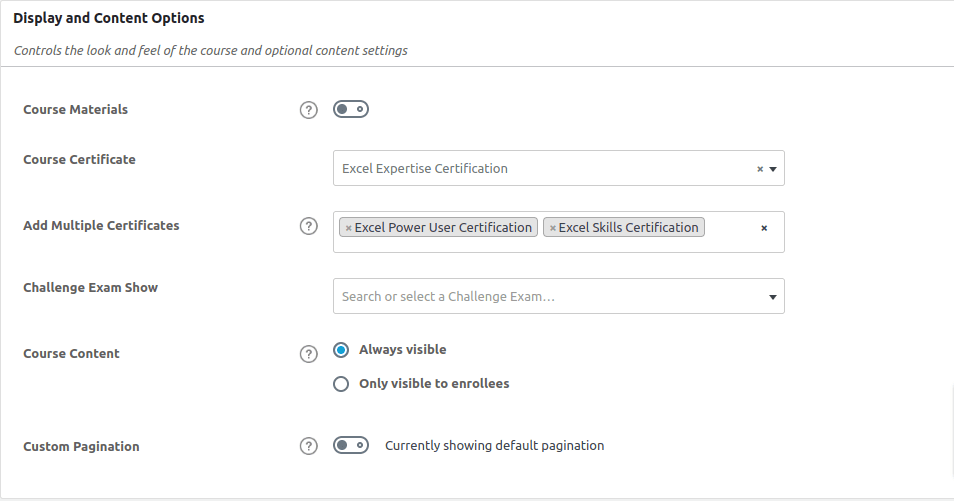
Setting multiple certificate for course
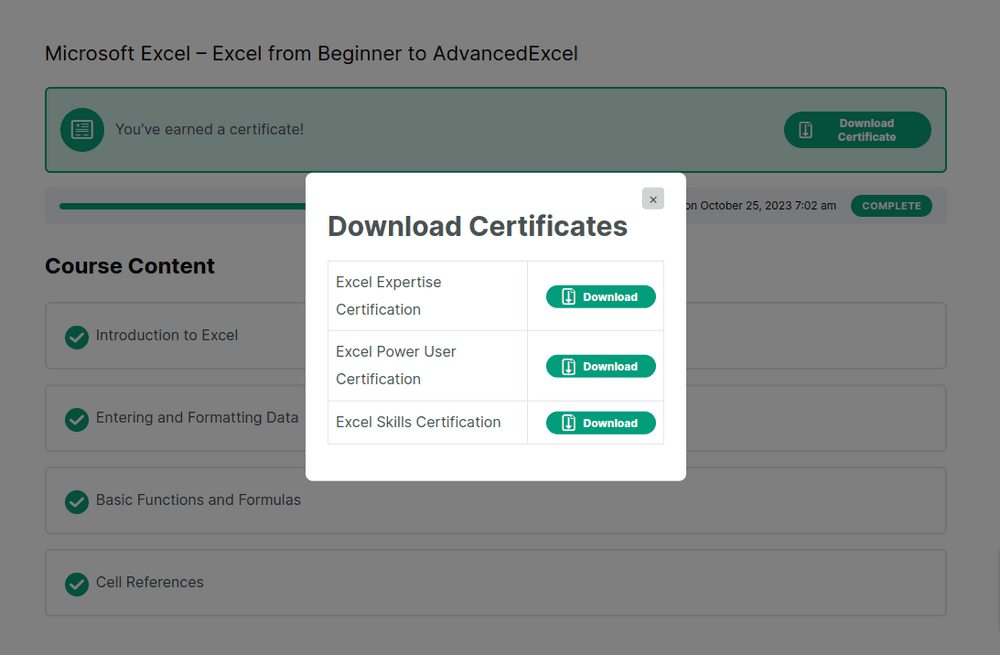
Download multiple certificates on course completion
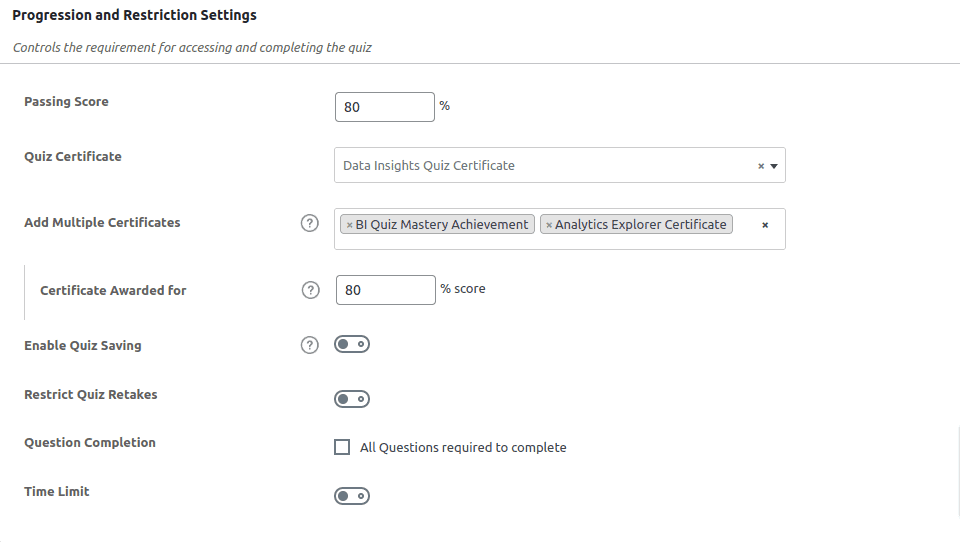
Setting multiple certificate for quiz
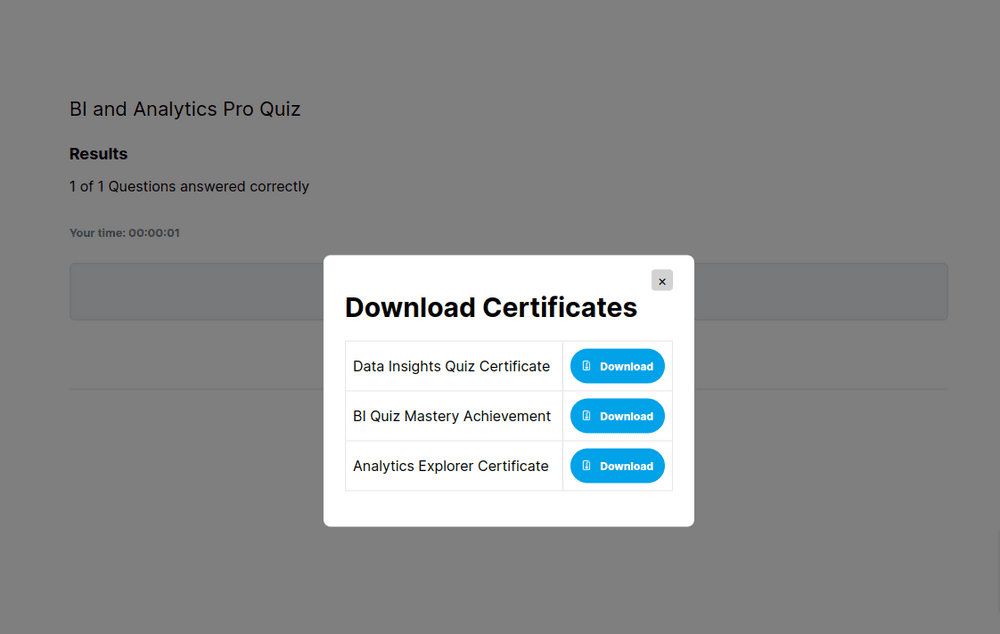
Download multiple certificate on quiz completion
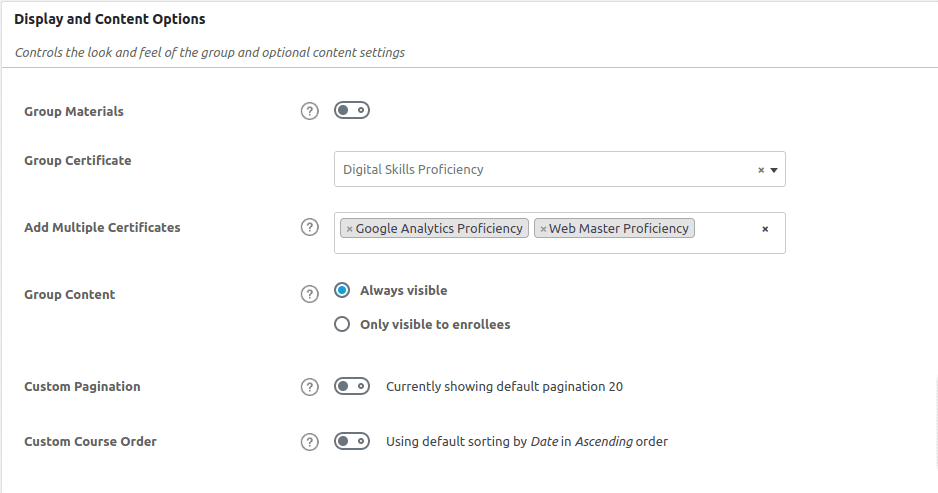
Setting multiple certificate for group
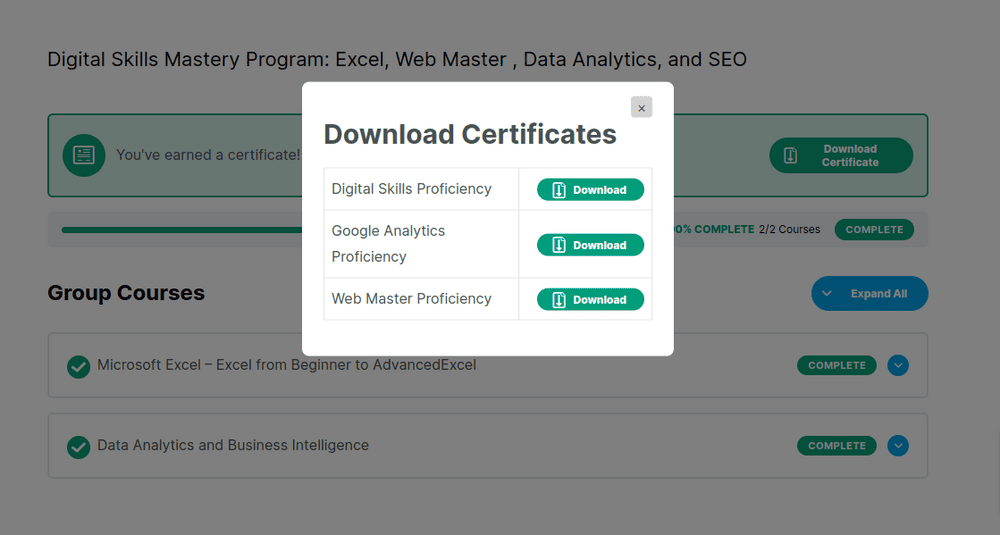
Download multiple certificate on group completion
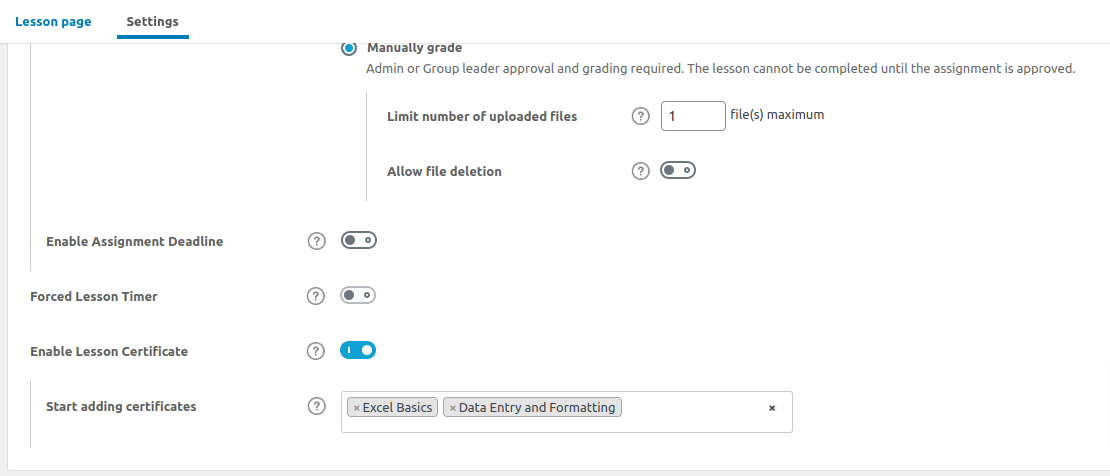
Adding certificates to lessons
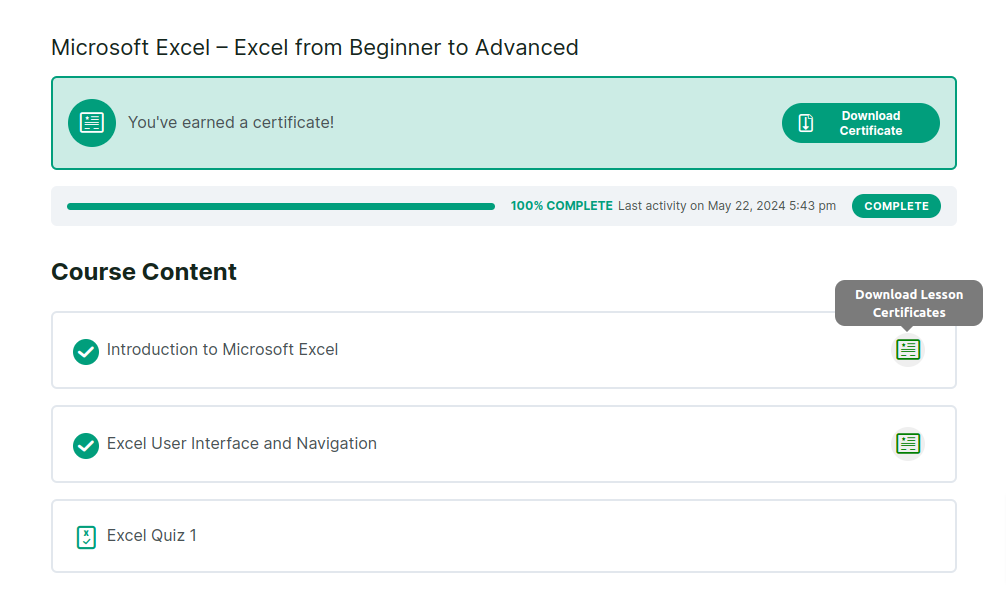
Certficate on lesson completion
Certficate on lesson completion

Course Certficates Email Settings
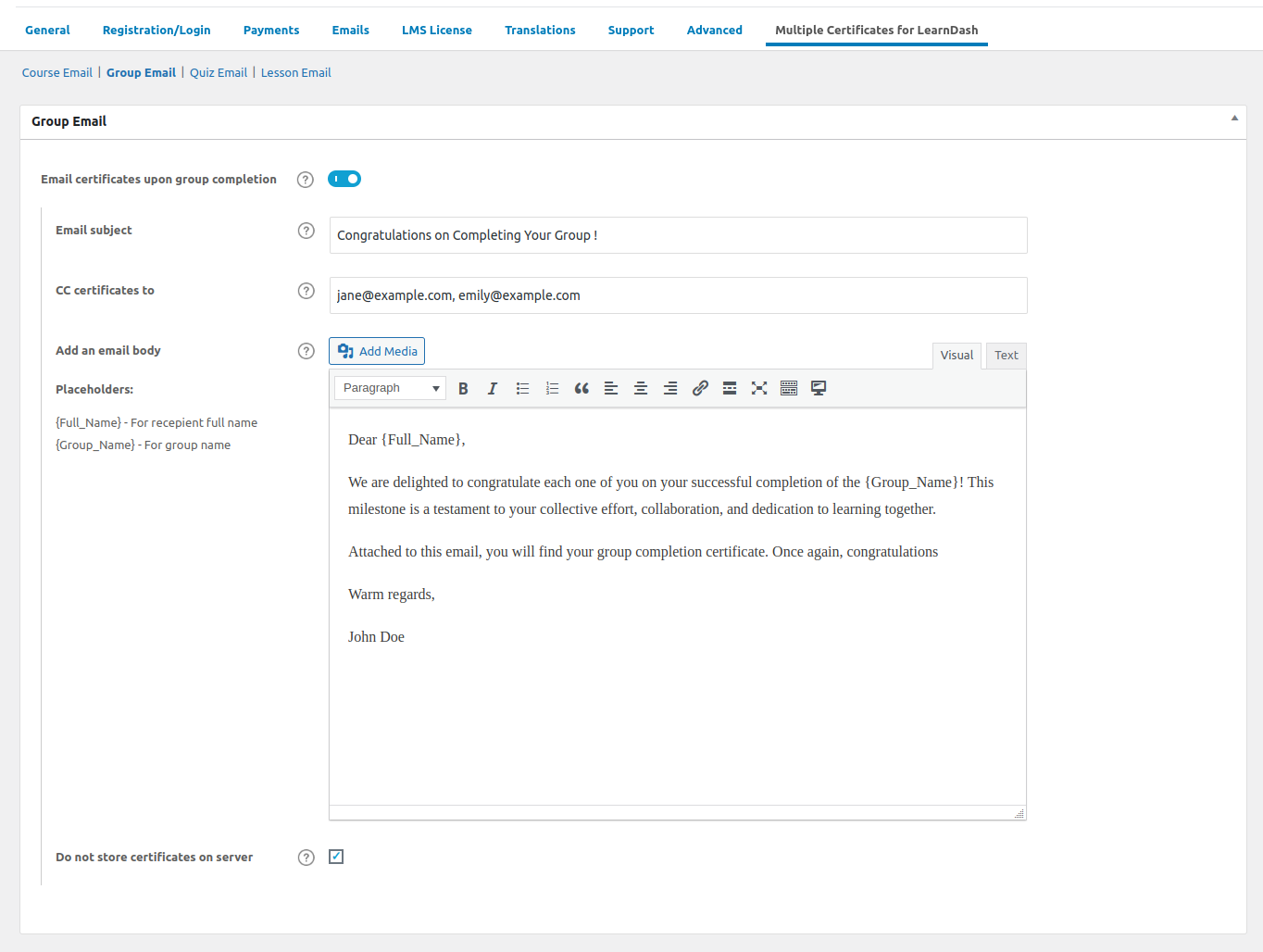
Group Email Certificate Email Settings
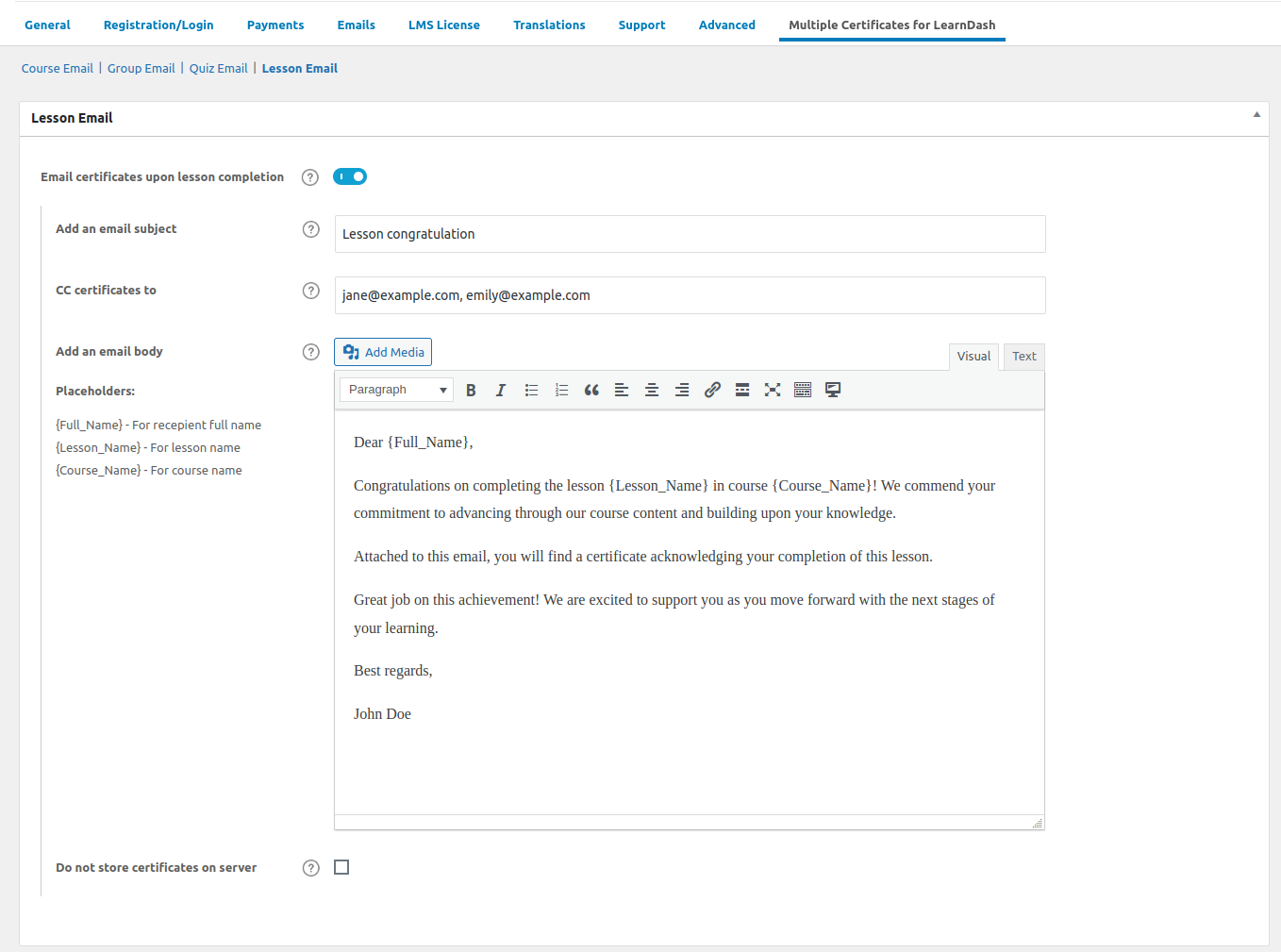
Lesson Certficates Email Settings
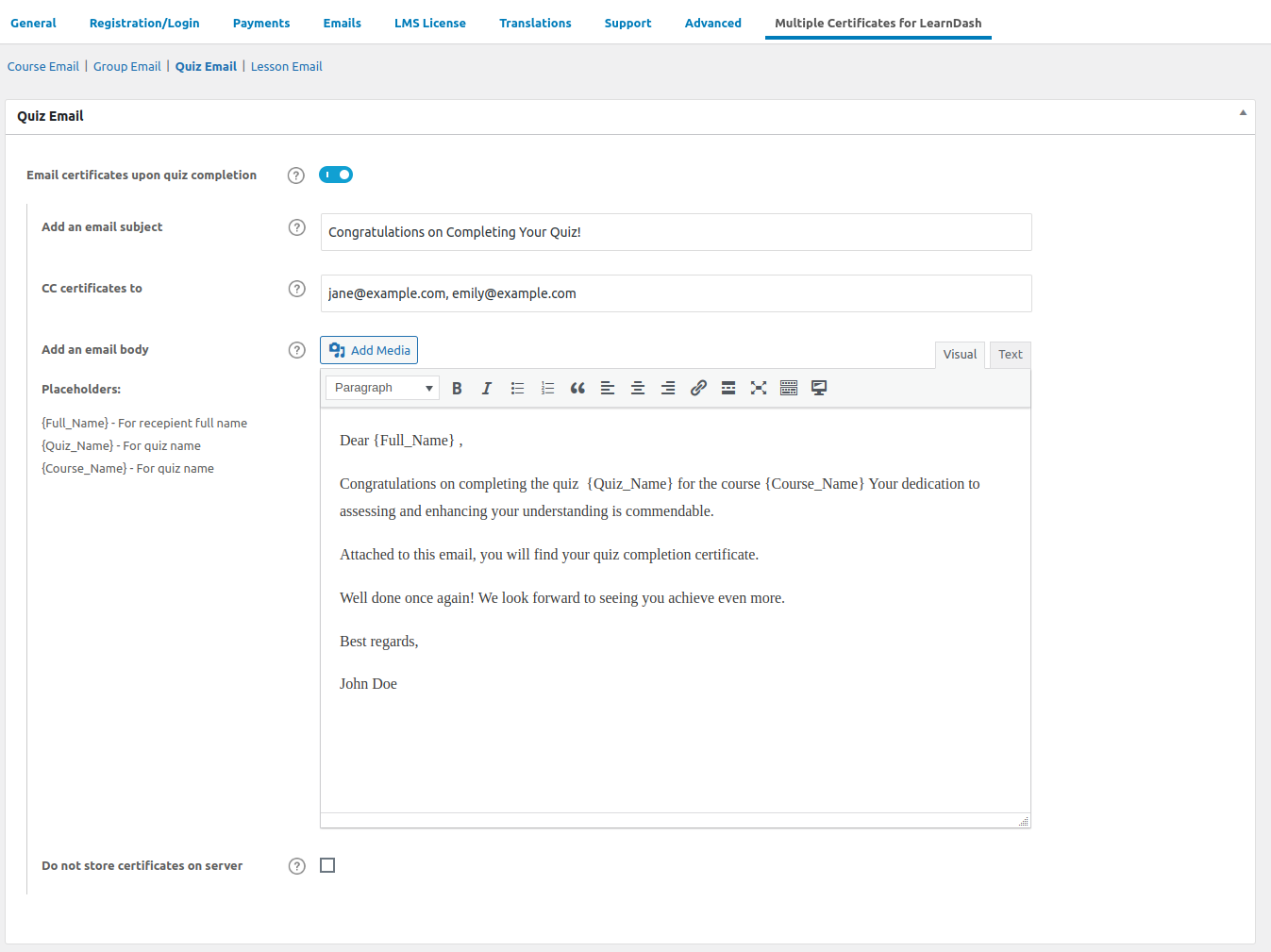
Quiz Certficate Email Settings
Documentation & Support
Installation Guide
Explore our guided documentation for a quick and hassle-free experience
Reviews
 Transformative Learning Experience
This plugin has transformed our e-learning curriculum by allowing us to provide a more granular recognition system. Each step of the course can now be recognized with a specific certificate, which is not just motivating but also helps in better categorizing course completions. It’s a simple yet powerful tool that adds significant value to any educational program.
Thank you for your feedback.
357 of 745 people found this review helpful.
 Customizable and User-Friendly
What I appreciate most about the Multiple Certificates plugin is its ease of use. Setting it up was straightforward, and the ability to customize each certificate to fit different courses and quizzes is fantastic. Plus, their customer support has been very helpful whenever I had questions.
346 of 692 people found this review helpful.
Help other customers find the most helpful reviews
Did you find this review helpful?
 Enhances Student Motivation
Seeing the immediate rewards in the form of multiple certificates has visibly boosted my students’ motivation. Each certificate represents a milestone for them, making the learning process more engaging and fulfilling.
374 of 784 people found this review helpful.
Help other customers find the most helpful reviews
Did you find this review helpful?
 Perfect for Varied Learning Paths
Our company’s training programs involve complex learning paths, and this plugin has been a game-changer. We can now award certificates for each module completed, which greatly motivates our staff. The plugin is easy to set up and integrates seamlessly with LearnDash.
364 of 743 people found this review helpful.
Help other customers find the most helpful reviews
Did you find this review helpful?