

Student Email Notifications for LearnDash
Engage, Inform, Succeed!
“Student Email Notifications for LearnDash” revolutionizes communication by allowing educators to send personalized, bulk emails to students based on their course activities. This plugin is perfect for course updates, assignment deadlines, and quiz performance, ensuring every student stays informed and engaged.
Current Version
2.6.0
WordPress
6.4.3 or Higher
LearnDash
4.10.3 or Higher
PHP
8.1 or Higher
Last Update
04 Aug 2026
Plugin Overview & Features
Imagine a world where every student feels seen, understood, and personally guided through their learning journey. That’s the world “Student Email Notifications for LearnDash” creates. With just a few clicks, teachers and administrators can send out personalized email blasts or announcements to individual students or groups, making sure everyone’s on track and in the loop.
This ingenious plugin is like a Swiss Army knife for sending LearnDash notifications. Whether it’s celebrating a quiz victory, reminding students about an assignment deadline, notifying them about course completion, or re-engaging inactive learners, this tool makes it a breeze. You’re not just blasting out emails; you’re crafting messages that resonate on a personal level, thanks to customizable email placeholders.
But what really sets this plugin apart is its smart filters. Want to congratulate those who aced the quiz? Or maybe send a gentle reminder via LearnDash email notifications to those who haven’t submitted their assignments? Easy. also filter students by course progress, quiz results, assignment status, enrollment date, and other criteria, making your communication razor-sharp and incredibly relevant.
Integration with Assignment Deadlines Pro Plugin further polishes this gem, allowing for even more precise communication based on submission statuses. And for the cherry on top, students can revisit these LearnDash notifications anytime via a dedicated tab on their course page, ensuring no important message ever slips through the cracks.
In essence, “Student Email Notifications for LearnDash” isn’t just a plugin; it’s your partner in creating an engaging, responsive, and cohesive learning environment. It’s perfect for educational institutions aiming to elevate their communication game and keep students informed, engaged, and motivated.
How Can This Plugin Be Used?
- Following Up on Student Inactivity
- Empower Group Leaders with Frontend Notification Management
- Sending Deadline Reminders for Assignments
- Encouraging Students to Retake Quizzes
- Sending Course Completion Announcements
- Announcing Group-Based Activities
- Congratulating Students on Quiz Success
- Issuing Personalized Study Tips
- Sending Course Expiry Reminders
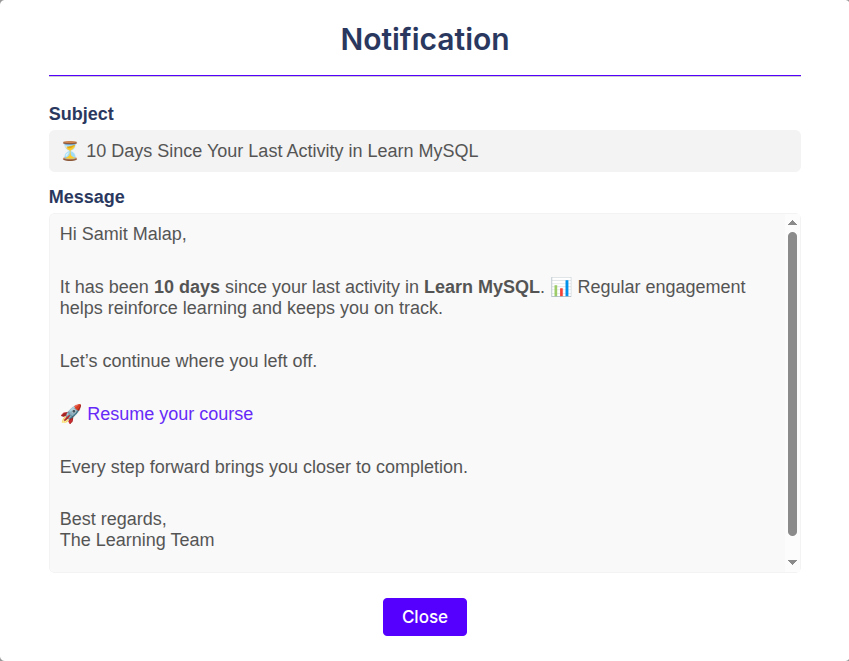
If students stop logging in or fail to make progress in a course, instructors can automatically send a reminder after a defined number of days. This helps re-engage learners who may have lost momentum without requiring instructors to monitor student activity manually.

Running a large eLearning platform with multiple student groups and Group Leaders can be time-consuming for an admin.
Instead of handling every notification yourself, Group Leaders can now use the front-end notifications panel to send notifications.
This way, if there’s an event update, they can quickly update and inform students directly, without needing backend access.
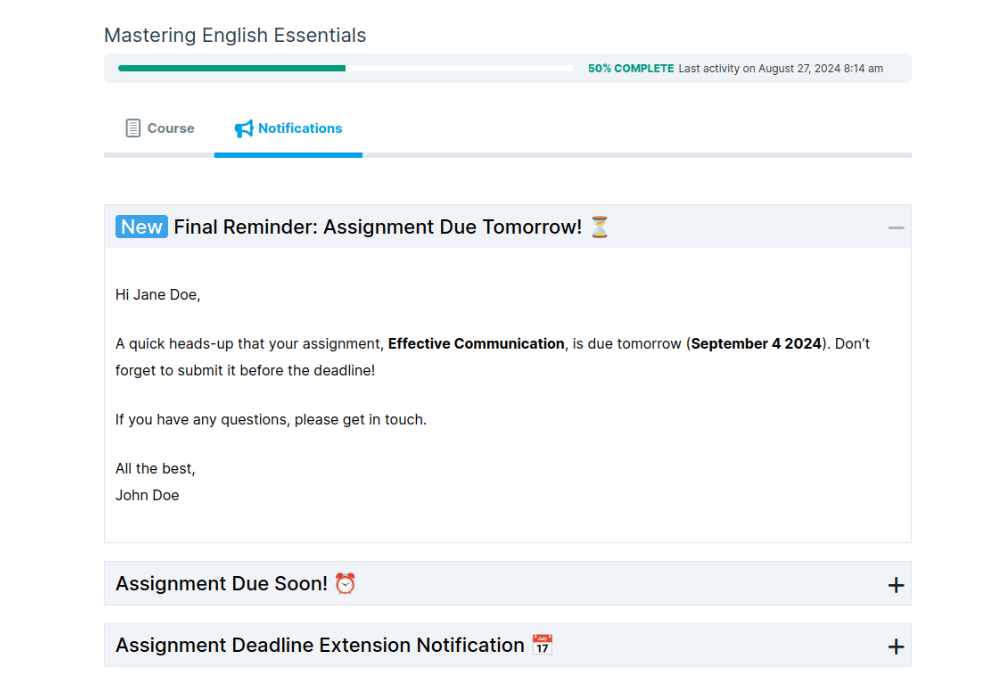
When integrated with Assignment Deadlines Pro, the plugin can send targeted LearnDash email notifications to remind students of upcoming assignment deadlines.
It ensures that students receive timely notifications about submission cutoffs and prevents late submissions.
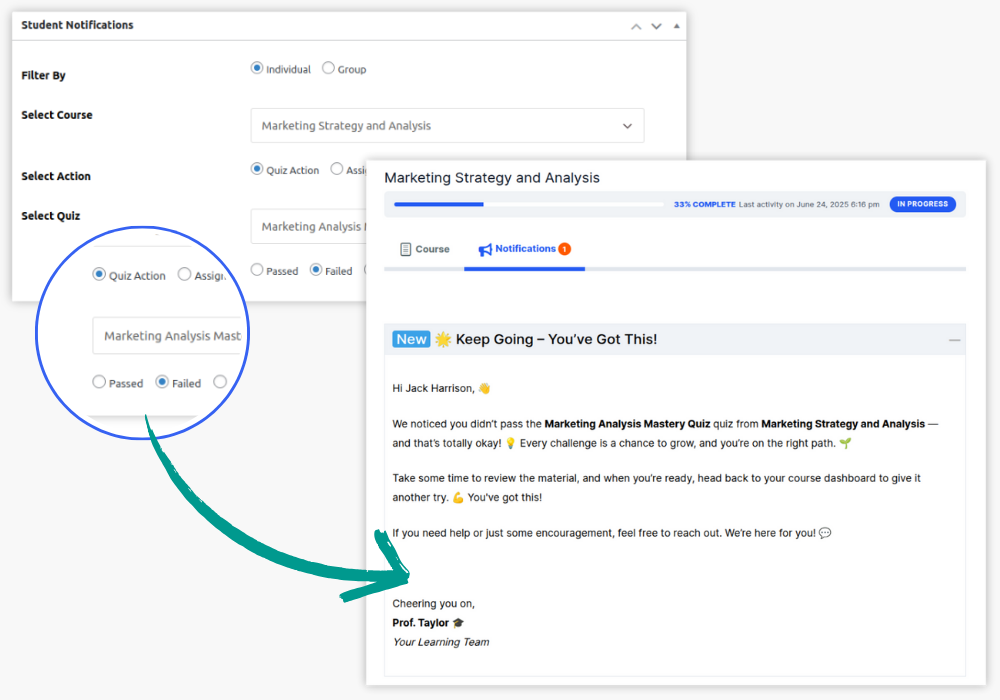
For students who didn’t pass a quiz, instructors can use LearnDash notifications to encourage them to try again.
The LearnDash email notifications plugin allows you to filter students based on their quiz results and send them messages motivating them to improve their scores.
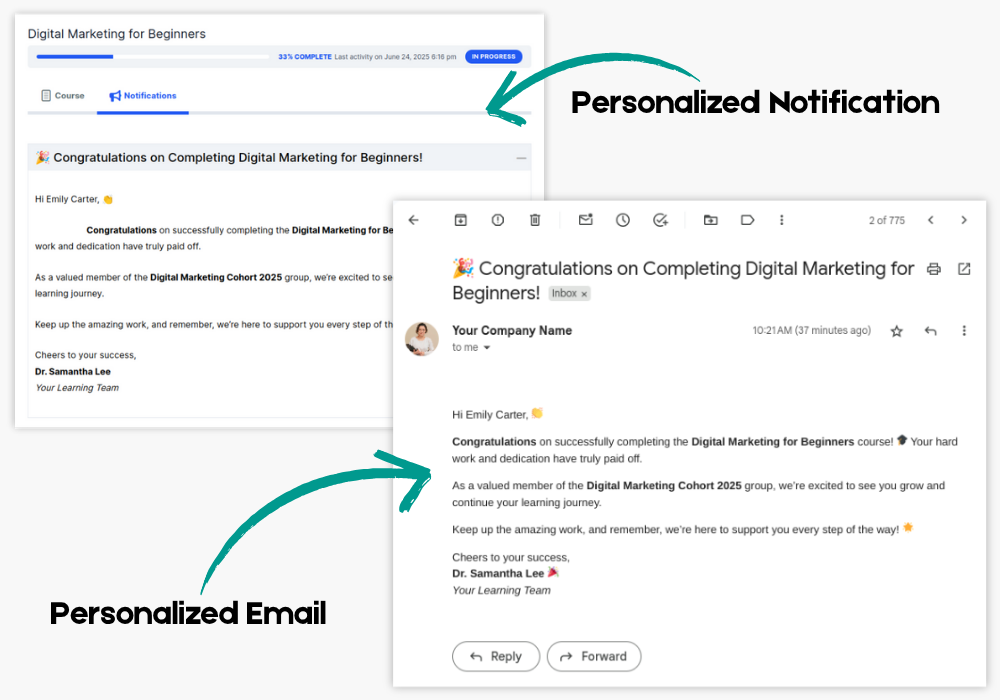
Once a student completes a course, you can manually send a personalized email to congratulate them on finishing.
These LearnDash notifications can also provide information on related courses they may want to take next, fostering continued learning.
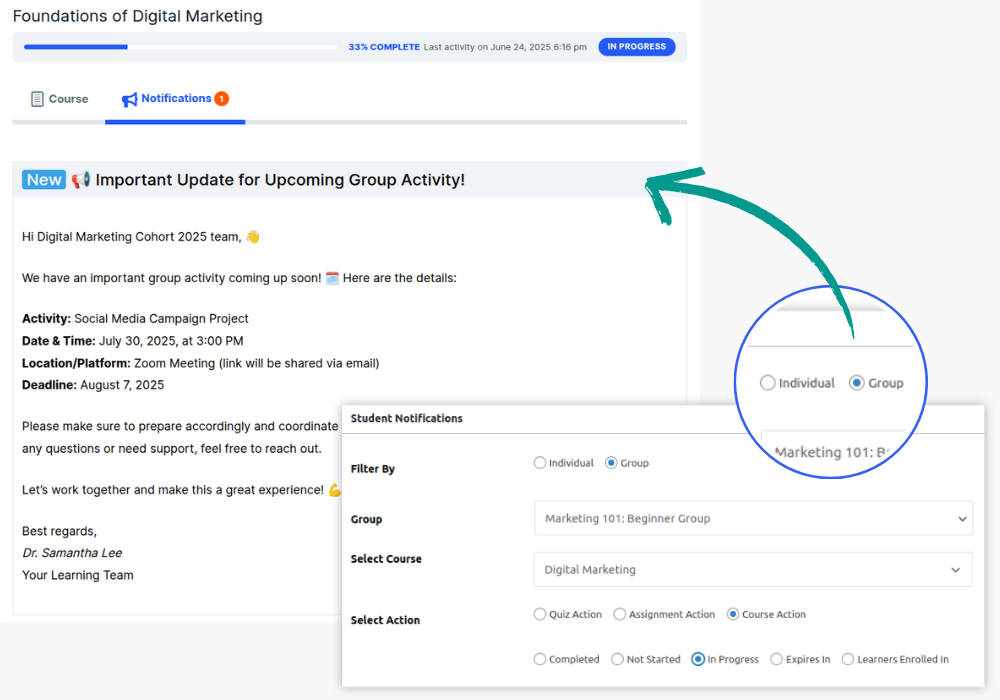
For group learning or projects, instructors can send LearnDash notifications to entire groups, keeping them informed of upcoming group activities, meetings, or deadlines.
This feature ensures that every group member is aligned and on the same page.
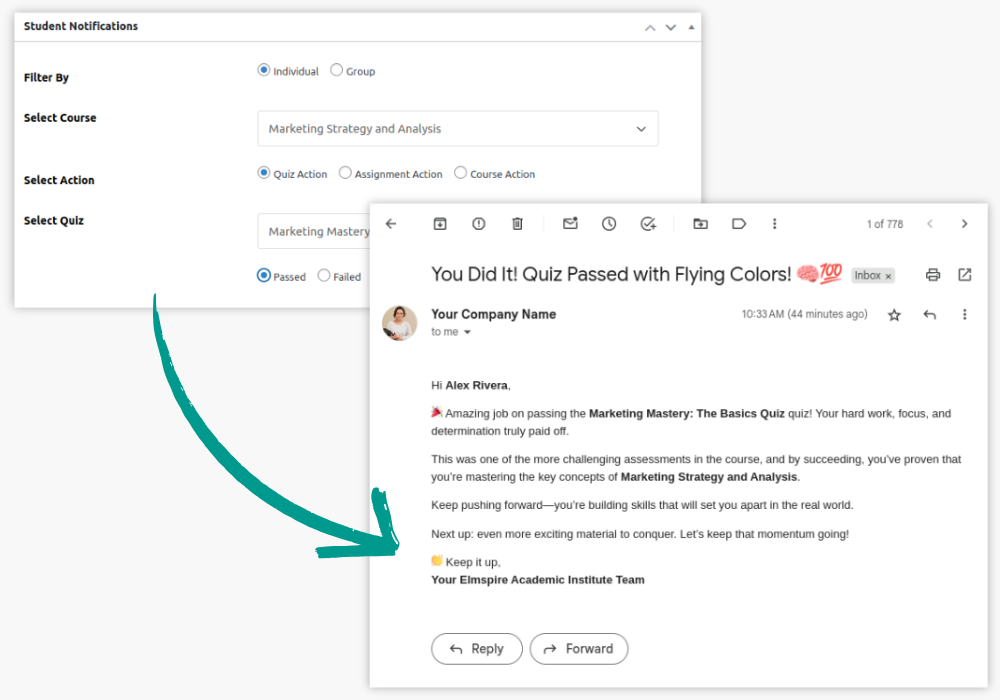
After students pass a challenging quiz, you can manually send personalized LearnDash notifications congratulating them.
Using placeholders like {Student_name} and {Quiz_name}, you can craft a motivational message that reinforces their accomplishment and boosts morale.
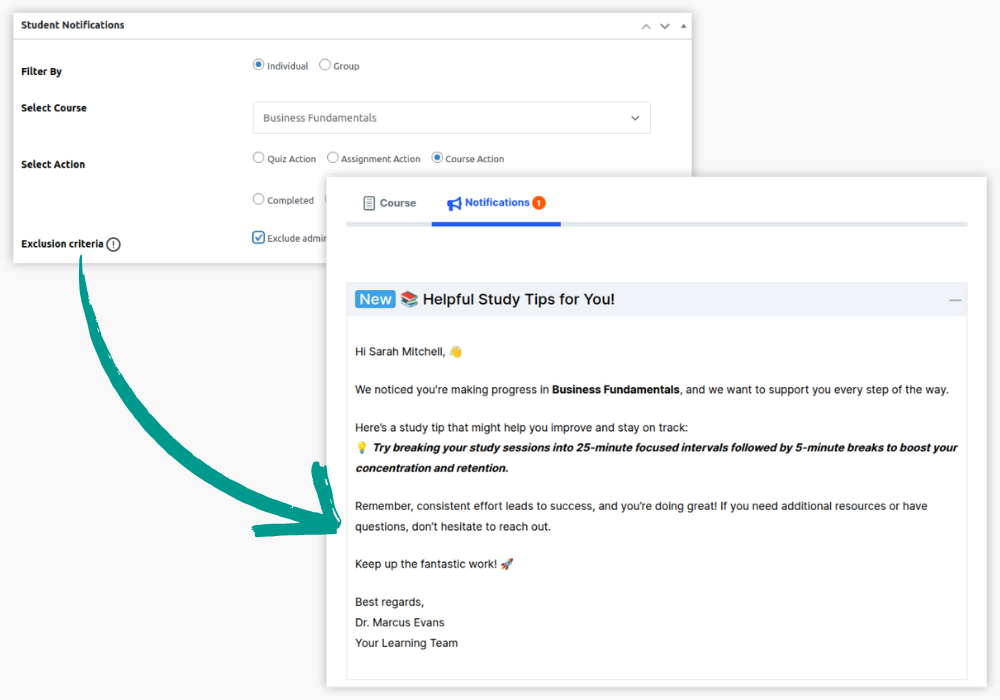
Instructors can use LearnDash email notifications to provide personalized study tips to students based on their course progress.
By using filters to identify students who may be struggling, instructors can offer extra support, resources, or advice to help them succeed.
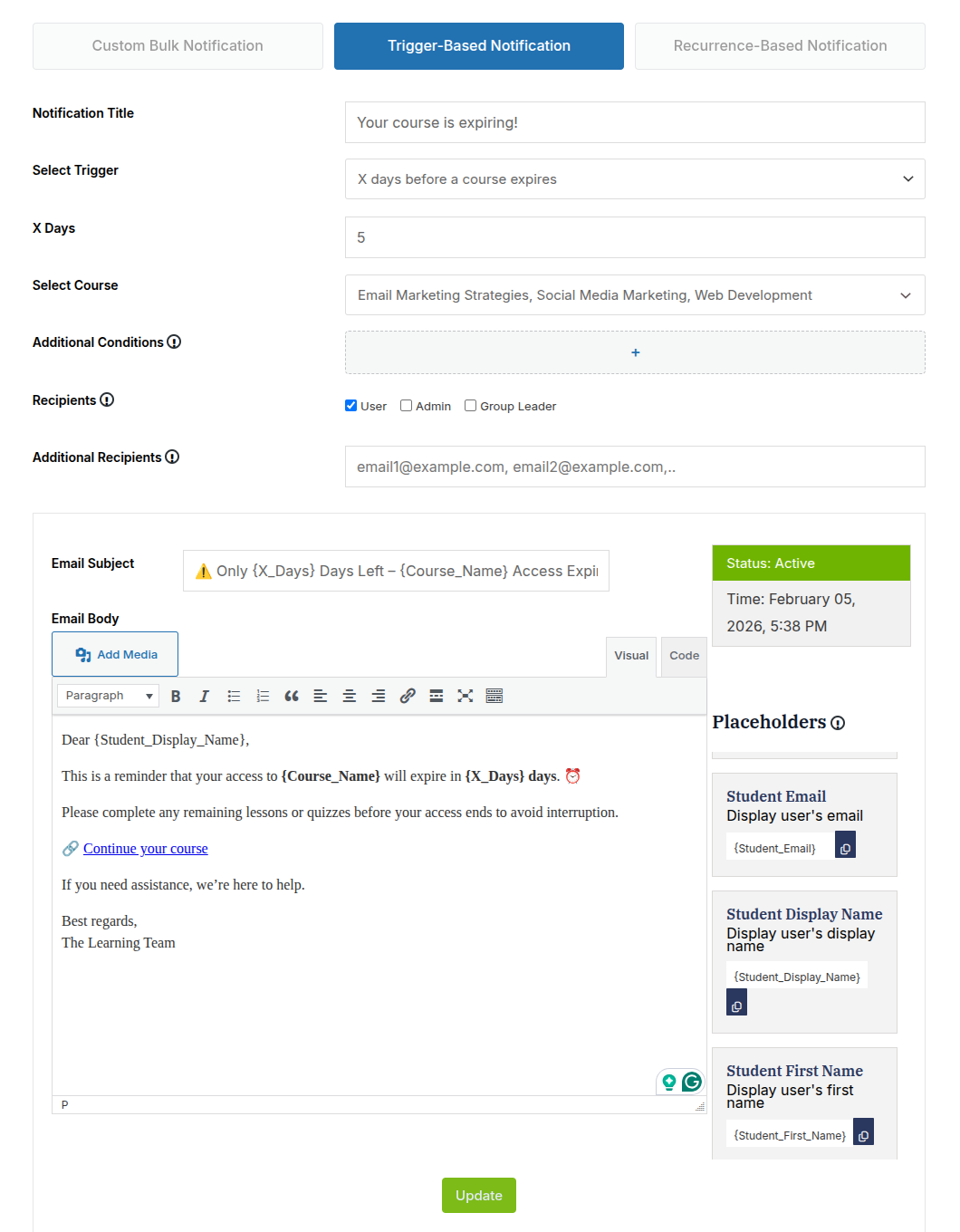
Instructors can automatically notify students a specific number of days before a course expires or after it has expired. These reminders can help students complete remaining lessons before access ends or provide relevant follow-up information after expiry.
Key Plugin Features
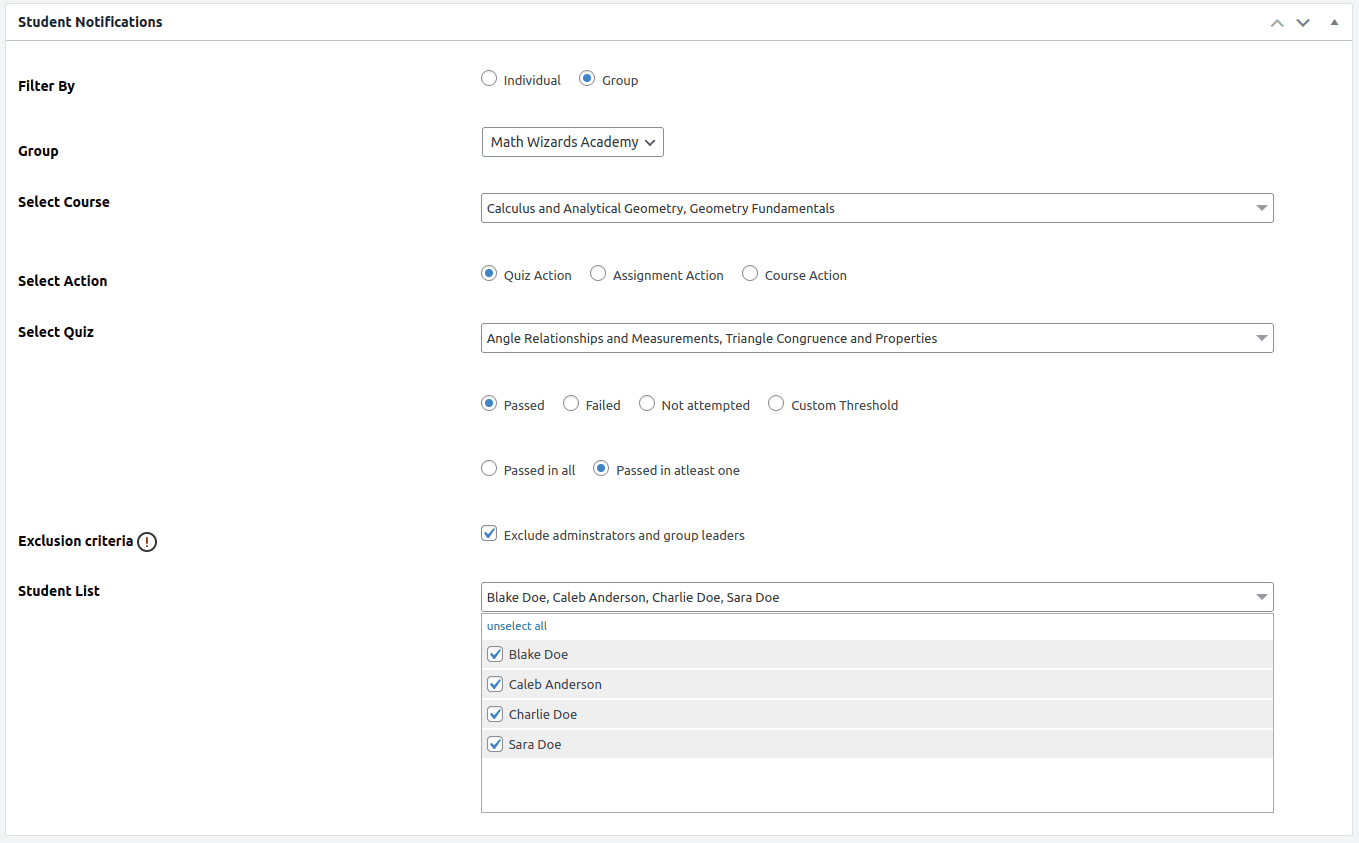
Unique Filters
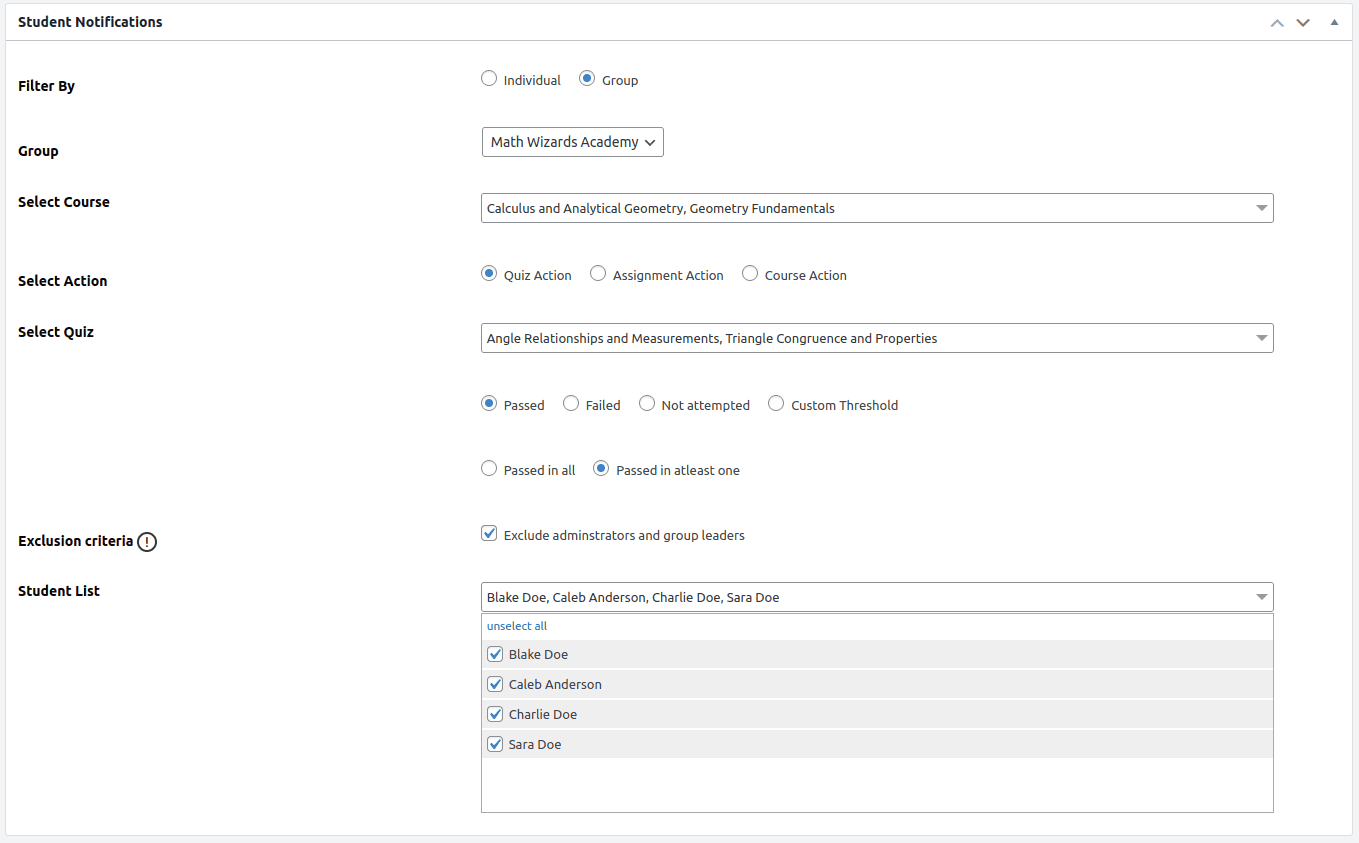
Quickly sort students by quiz scores, course progress, or assignment status to tailor your communication.
Quiz Action Filters: Celebrate quiz successes or encourage retries with customized messages based on quiz performance.
Assignment Action Filters: Keep students on track with reminders and praises for assignment submissions.
Course Action Filters: Segment students based on their course journey – completed, in progress, or not started.
NEW
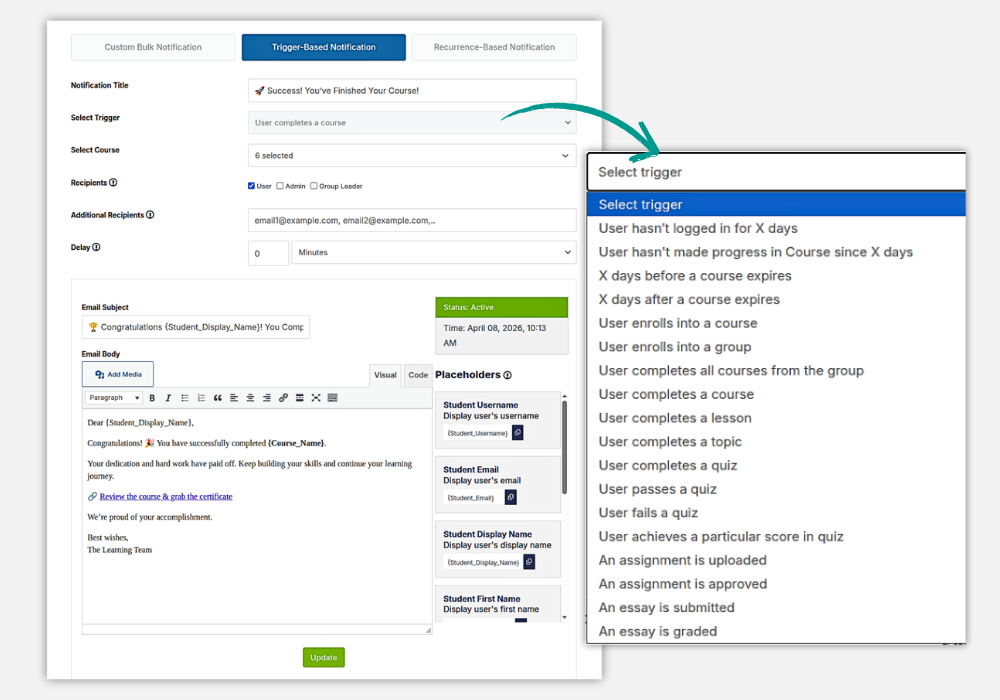
Trigger-Based Notifications
Automate student communication based on specific LearnDash activities. The plugin supports 18 trigger events, allowing emails to be sent automatically when important learning actions occur.
Triggers can include course, lesson, topic, or quiz completion; course or group enrollment; quiz pass, fail, completion, or specific score achievement; assignment uploads or approvals; essay submissions or grading; inactivity; lack of course progress; and course expiry reminders.
You can also add delays, select recipients, and personalize the message with dynamic placeholders.
NEW
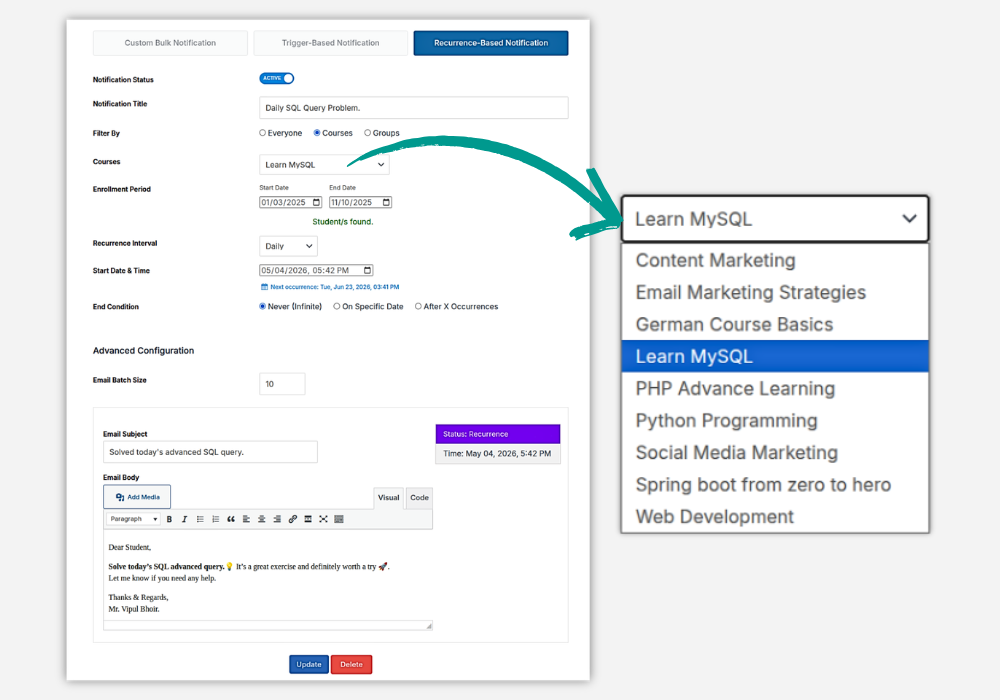
Recurring Notifications
Keep students engaged with scheduled emails that repeat automatically. Send daily, weekly, or monthly learning reminders, practice prompts, progress updates, or other recurring communications.
You can target all students, selected courses, or selected groups, filter recipients by enrollment period, and choose when the recurring sequence should stop. Batch-size controls also help manage email delivery more efficiently.
Personalized Notifications
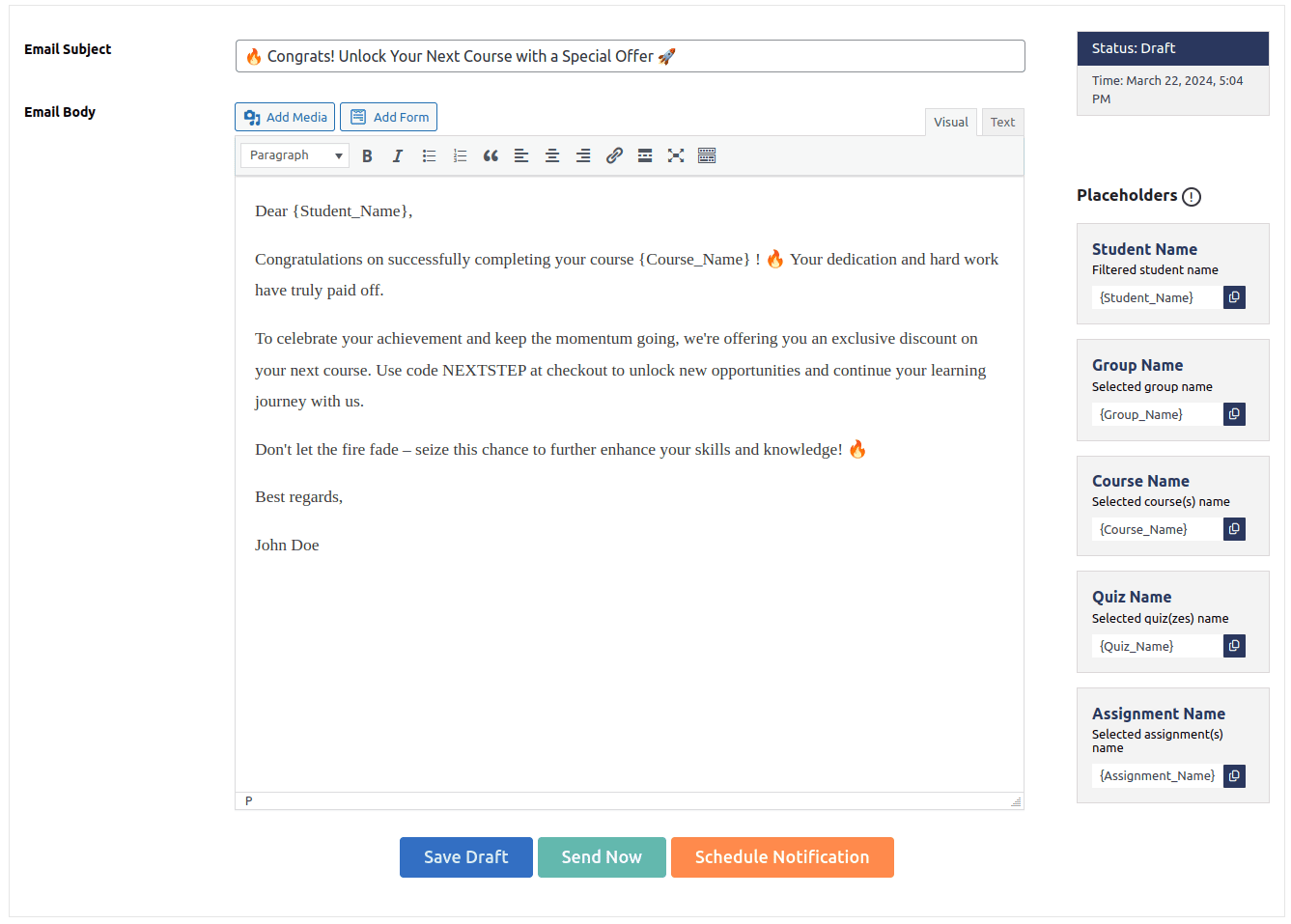
Create more relevant and personalized LearnDash email notifications using 30+ dynamic placeholders. The plugin supports placeholders for student details, courses, groups, quizzes, lessons, topics, assignments, essays, and X-day-based notifications.
You can automatically include information such as student name, course name, quiz score, assignment link, lesson link, and group name in the email subject or body.
Notifications Tab
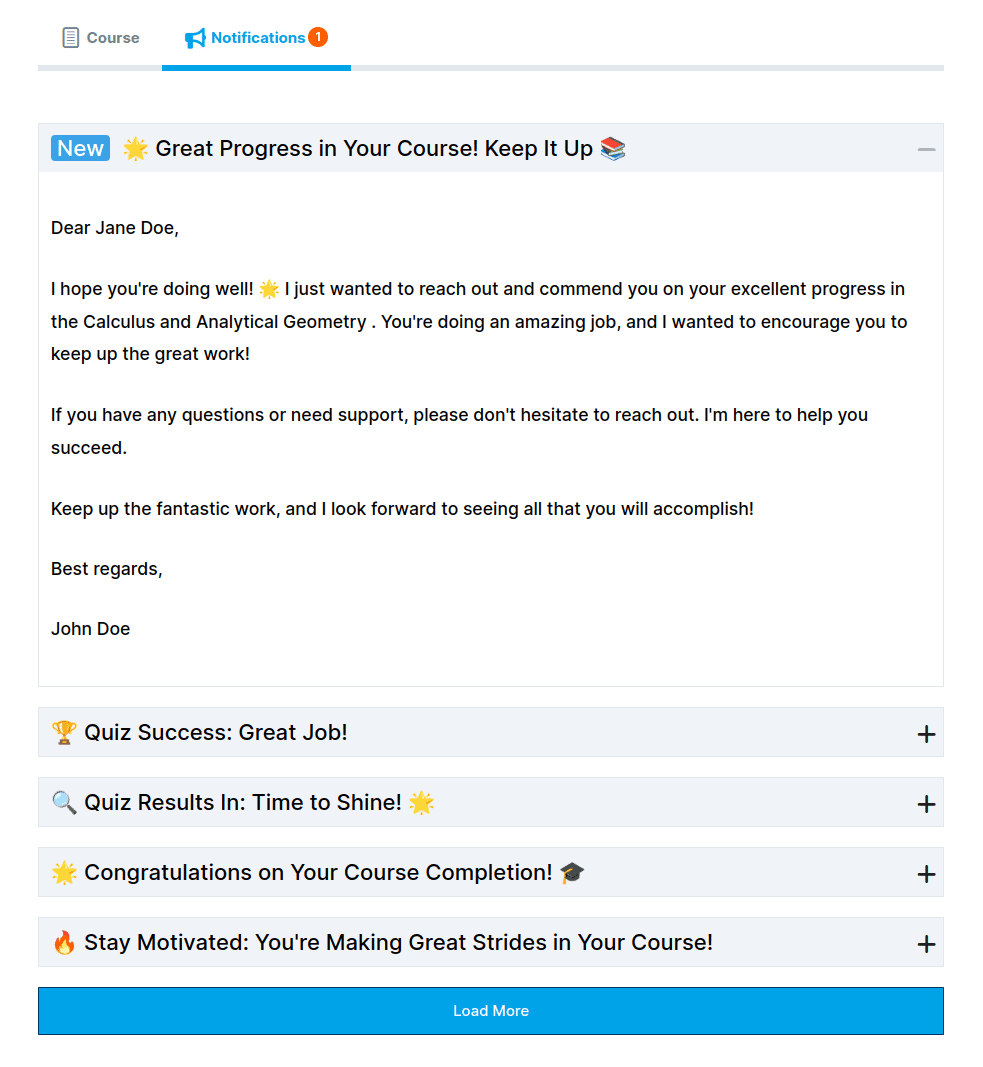
This LearnDash notifications plugin not only allows you to send emails but also comes with a dedicated space on the course page to ensure that all LearnDash email notifications sent to the students are never missed.
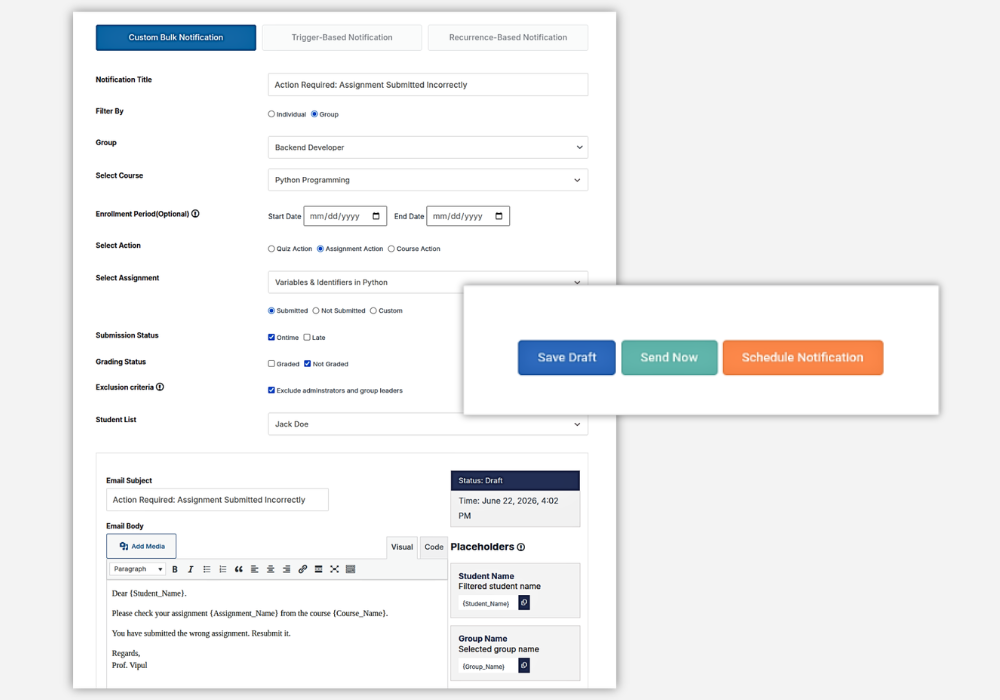
Schedule Notifications
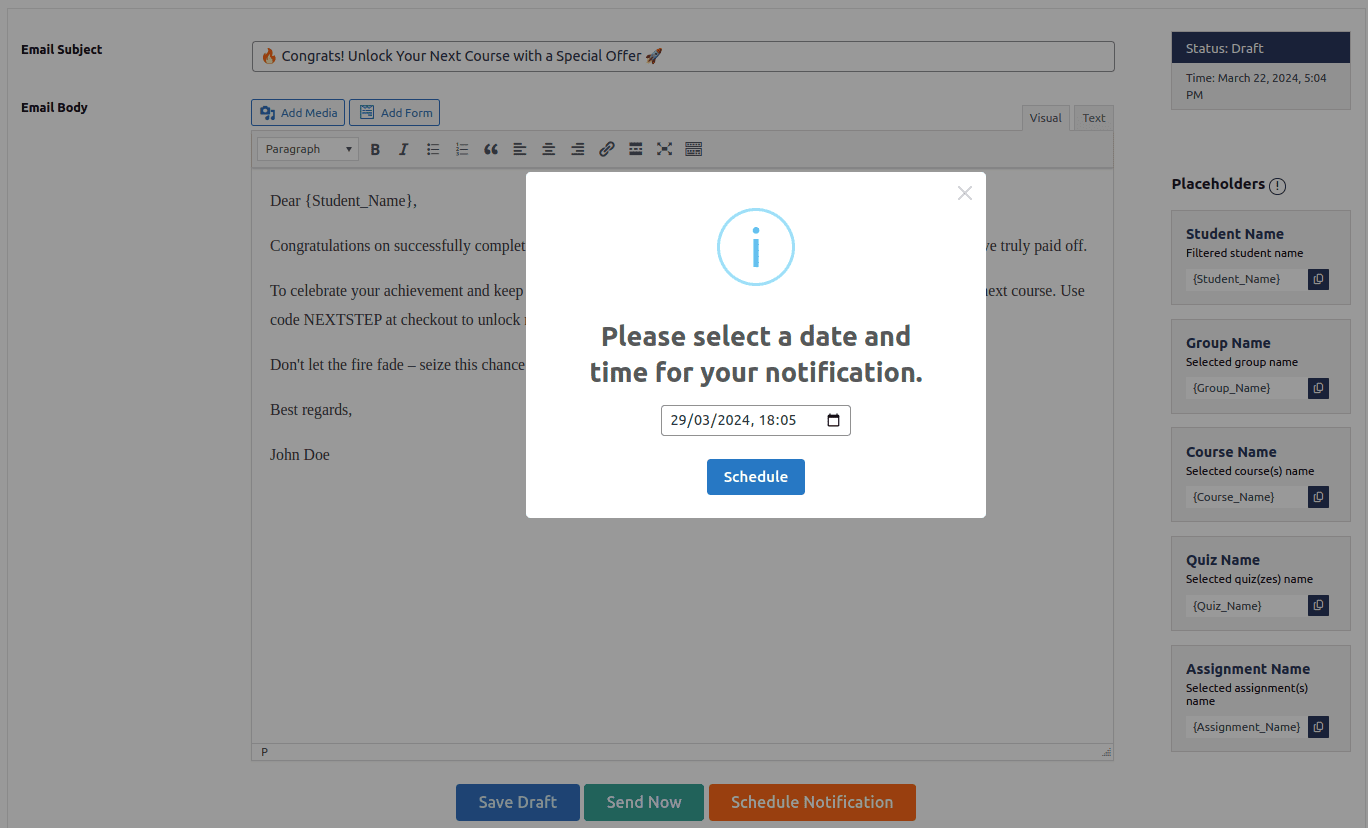
Want to send your LearnDash email notifications to your students at a perfect time?
Awesome! This plugin offers options to schedule your notifications at a particular date and time apart from the option to send immediately for perfect timing.
Individual and Group Filters
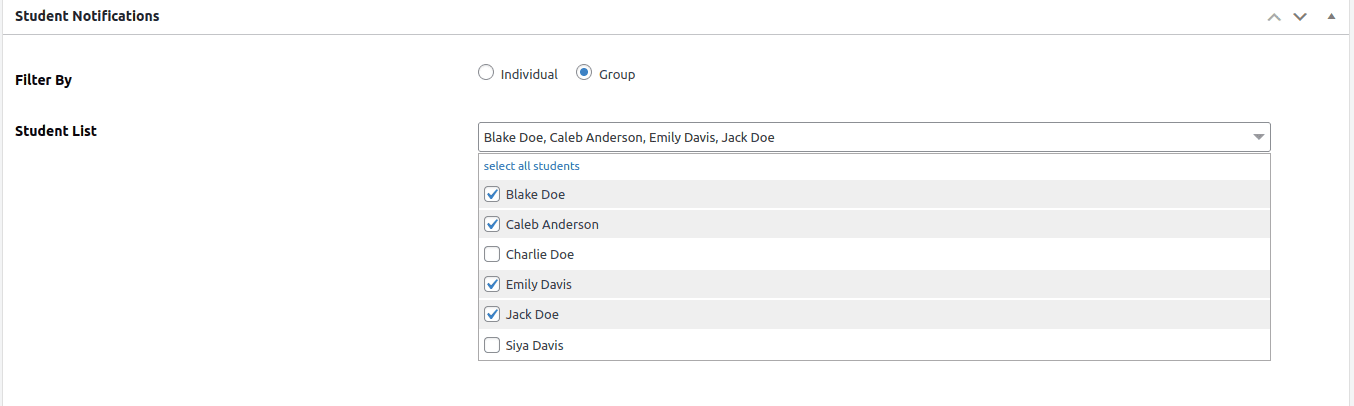
Whether addressing an entire group or a single student (individual learner), ensure your message hits the mark. On top of that, you can cherry pick students who you particularly want to send the LearnDash email to within the list of students that have been qualified based on your chosen criteria.
Multiple Course Selection
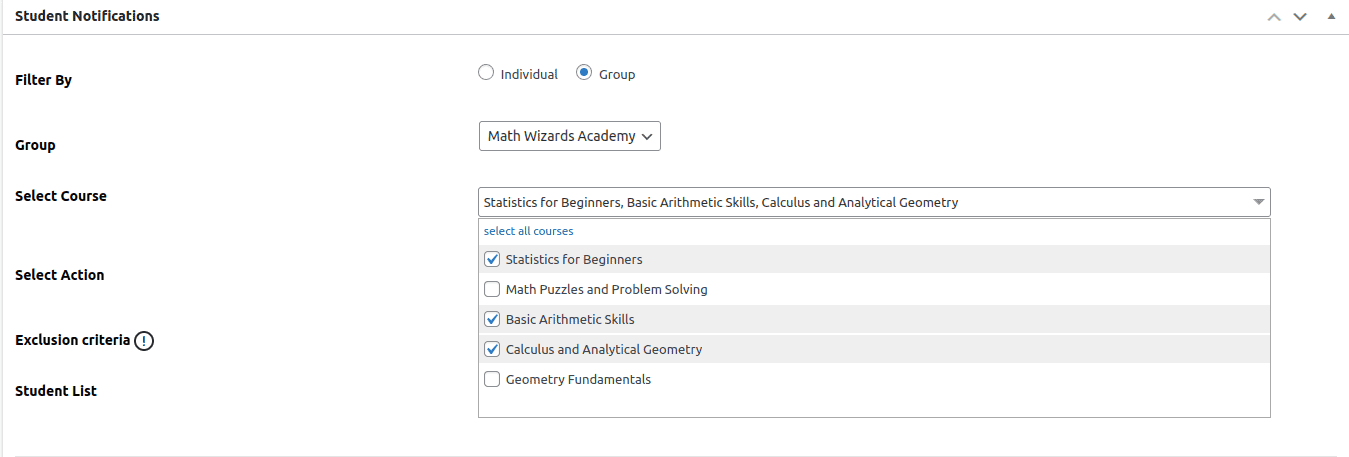
Looking to reach out to a set of students who are enrolled in a particular set of courses? Cool. This LearnDash email notifications plugin offers flexibility to get all students who are enrolled in multiple courses and offers you to further deep dive into other criteria so that you can reach out to those particular students of your choice!
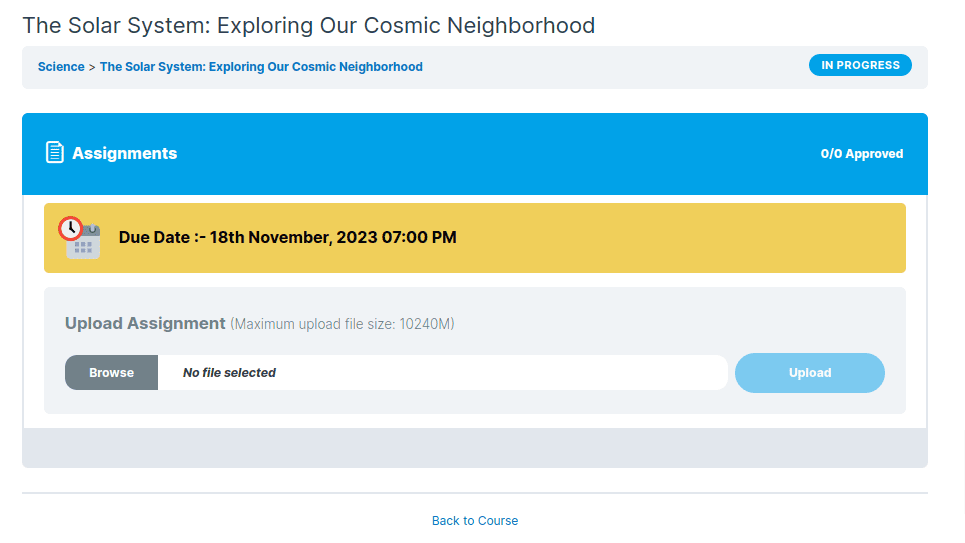
Integration with Assignment Deadlines Pro
Now you can also enforce fairness and discipline in your students who submit assignments late. This plugin integrates with the Assignment Deadlines Pro plugin to elevate deadline tracking with advanced filtering for late submissions.
NEW
Create Student Notifications from Frontend!
Don’t like to give WordPress dashboard access to your course instructors or group leaders?
No problem. Now, you can easily create, send, and schedule LearnDash email notifications without ever needing to access the backend.
Because your instructors can access all the features for creating LearnDash notifications from your website’s front end. This simple and direct approach lets you communicate with students quickly and efficiently, saving you time and streamlining your workflow.
NEW
Email Logs
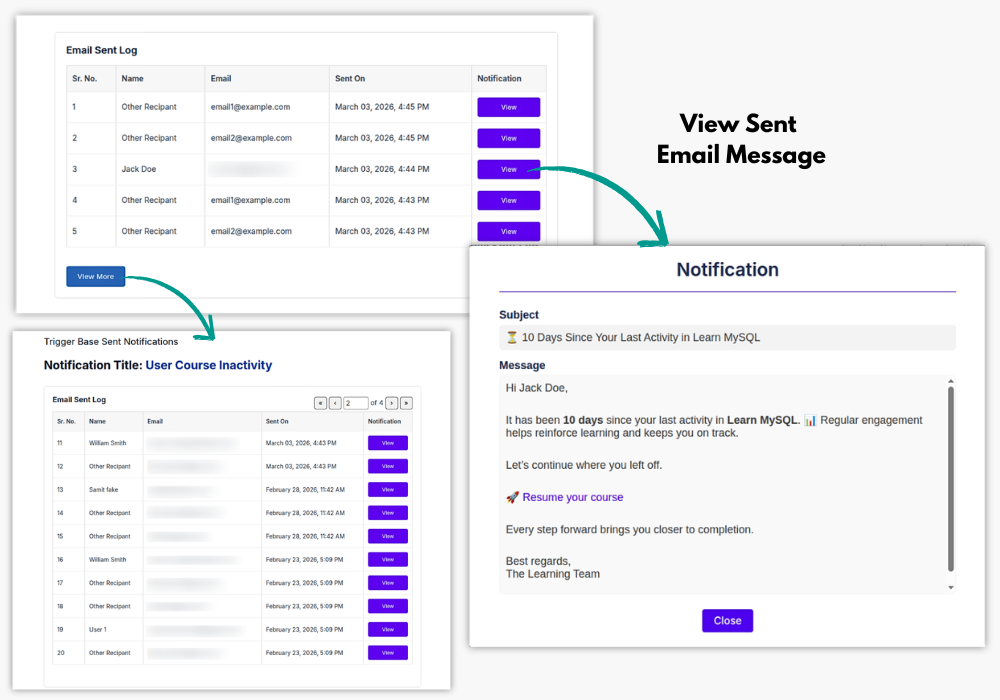
Review emails sent through trigger-based and recurring notifications using the built-in sent email log. Administrators can view notification history, recipient details, sent date and time, and the exact subject and message that were delivered.
The email log also includes pagination, making it easier to review a larger notification history.
How You Can Benefit from Student Email Notifications for LearnDash
1 Enhanced Student Engagement
With personalized and timely LearnDash notifications, you can keep students engaged and motivated. Whether it’s a reminder about an upcoming quiz or a congratulatory message for completing a course, LearnDash email notifications make students feel supported and connected throughout their learning journey.
2 Improved Communication Efficiency
Our Student Email Notifications for LearnDash plugin allows you to send targeted LearnDash email notifications to individuals or groups of students with ease.
You can quickly filter students based on their progress, assignment submissions, or quiz scores, ensuring that your communication is highly relevant and effective.
3 Personalized Messaging
The ability to craft messages with customizable placeholders like {Student_name}, {Course_name}, and more ensures that each student receives a personal touch.
These personalized LearnDash notifications boost the emotional connection between the student and the course, making the learning experience more engaging and meaningful.
4 Increased Course Completion Rates
By sending regular LearnDash email notifications to students based on their course progress, you can encourage those who may be falling behind to stay on track, ultimately improving course completion rates.
5 Seamless Assignment Management
When integrated with the Assignment Deadlines Pro plugin, this plugin allows you to send targeted LearnDash email notifications to remind students about upcoming or missed deadlines, ensuring a smooth assignment submission process. This leads to greater accountability and discipline in managing coursework.
6 Automated Notifications and Scheduling
The plugin’s ability to schedule LearnDash notifications in advance means you can set reminders, follow-ups, and announcements to be delivered at optimal times, without needing to manually send them each time. This automation saves you time while ensuring timely communication.
7 Simplified Notification Management
The plugin’s frontend management capability allows instructors and group leaders to send, schedule, and manage LearnDash email notifications without accessing the WordPress dashboard. This easy-to-use interface makes it more convenient for non-technical users to communicate effectively with students.
8 Trackable Student Notifications
All LearnDash email notifications are stored in a dedicated Notifications tab on the course page, so students can revisit important announcements anytime. This ensures that no message is missed and students can stay informed.
9 Better Group Communication
For group-based learning, the plugin allows you to send LearnDash notifications to entire groups or segments of students enrolled in specific courses. This flexibility is ideal for cohort-based training, corporate learning, or group assignments, ensuring everyone stays on the same page.
10 Improved Accountability with Filtering
With advanced filtering options, you can target students who are lagging, excelling or need specific attention. This precision ensures that each student receives the right message at the right time via LearnDash email notifications, making your communication more effective and goal-oriented.
Try Student Email Notifications for LearnDash!
View DemoPricing Plans
Student Email Notifications for LD
$89
$67
Student Email Notifications PLUS
$122
$92
LearnDash Basics Addon Pack
$133
$100
Student Email Notifications for LD
$349
$262
Student Email Notifications PLUS
$499
$374
LearnDash Basics Addon Pack
$549
$449
* All Lifetime Licenses come with 3 Years of Support and Lifetime Updates.

100% Risk-Free Money Back Guarantee!
We guarantee you a complete refund for new purchases if a request is made within 15 Days of purchase
Frequently Asked Questions
How does the filter function work?
Use various filters to sort students by quiz performance, course progress, or assignment status, making it easy to target your LearnDash email notifications.
Can I send emails to individual students who are not enrolled in any group?
Absolutely! You can personalize your LearnDash notifications to individual students or send announcements to groups based on your selected criteria.
Is it possible to schedule email notifications?
Yes, you have the flexibility to send LearnDash emails immediately, schedule them for a future date, or save them as drafts.
How do students access these email notifications?
Students can receive LearnDash emails directly and also view the announcements on their course page under the announcements tab.
Can this plugin integrate with other plugins?
Yes, it seamlessly integrates with the Assignment Deadlines Pro plugin enhancing its functionality.
What kind of customizations can I include in email messages?
You can use placeholders like {Student_name} and {course_name} to personalize the LearnDash email messages for each student.
Is this plugin suitable for all types of educational institutions?
Yes, it’s ideal for schools, universities, and training institutions looking to enhance student communication and course management.
I am not able to find the solution I’m looking for. Can you develop it for me?
Yes, we offer LearnDash Customization services for specific requirements.
How can instructors and group leaders create and manage student notifications from the frontend?
Instructors and group leaders can now create, send, and schedule student notifications directly from the website’s frontend, without needing access to the WordPress dashboard This feature allows them to quickly and efficiently communicate with students, saving time and streamlining the workflow. They can access all necessary tools for managing notifications right from the website interface.
What options are available for managing student notifications on the frontend?
Instructors and group leaders can manage all student notifications from the frontend. They can easily add a new notification, check for the status of notifications, search for a notification, or even trash a notification.
Screenshots
Student Notification Filters
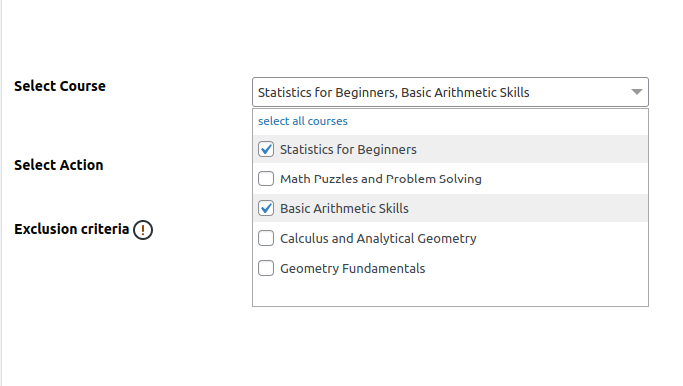
Multiple Course Selection
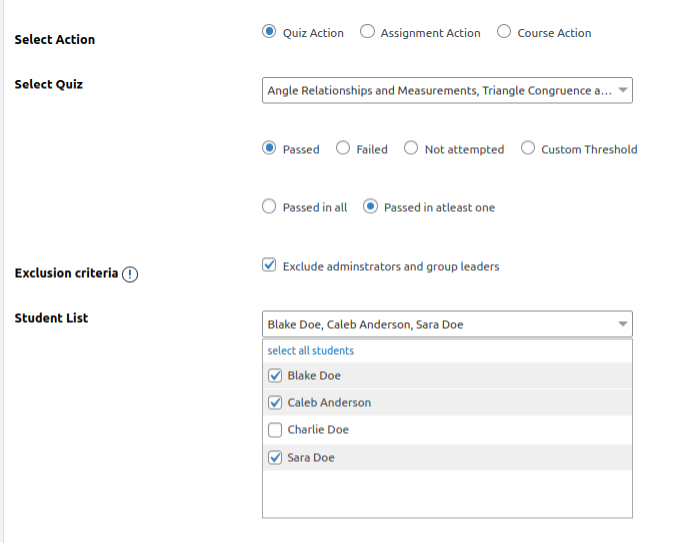
Quiz Action
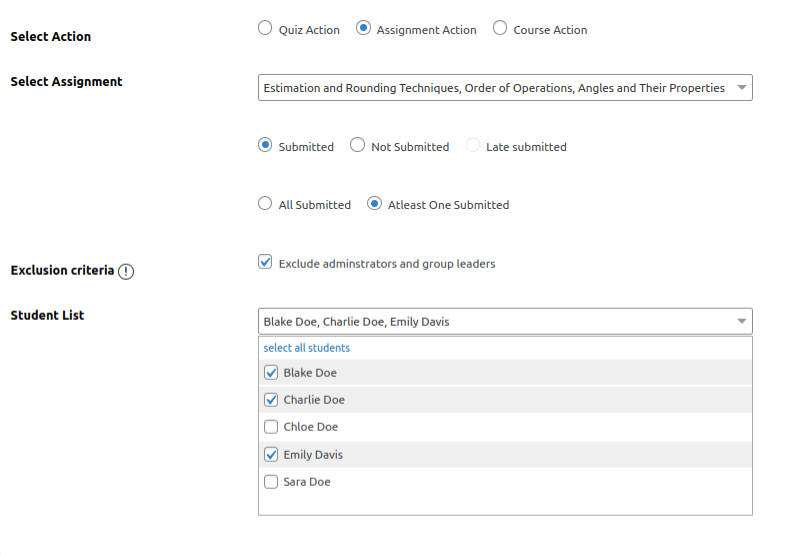
Assignment action
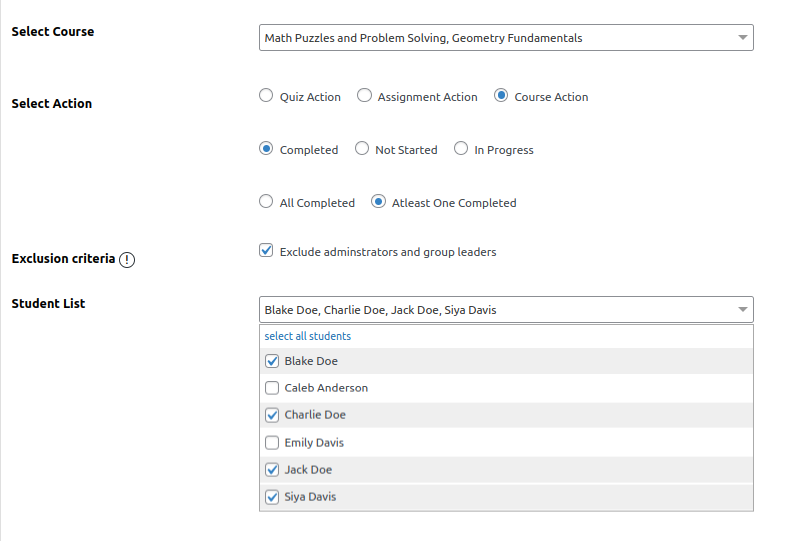
Course Action
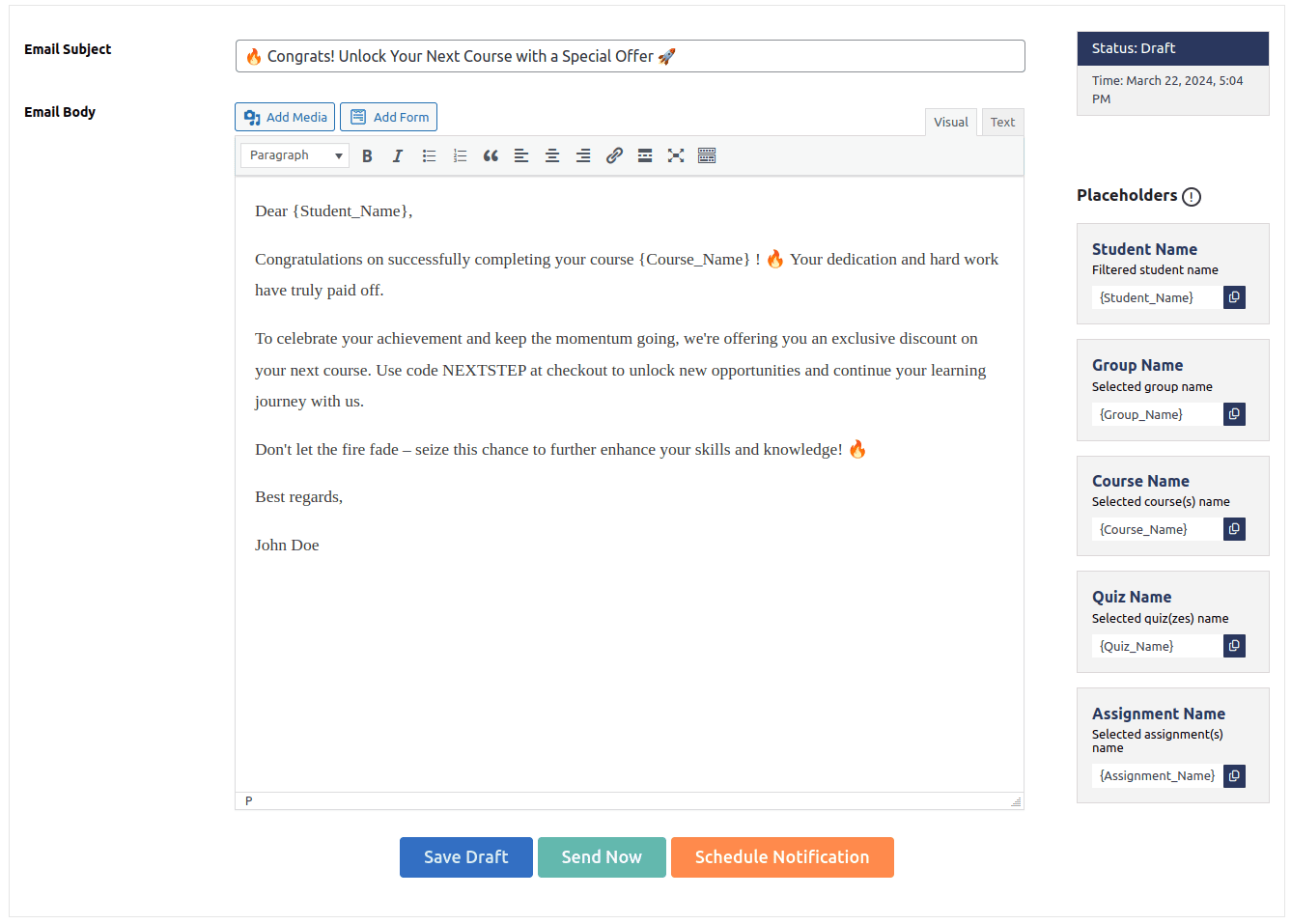
Draft Personalized Emails
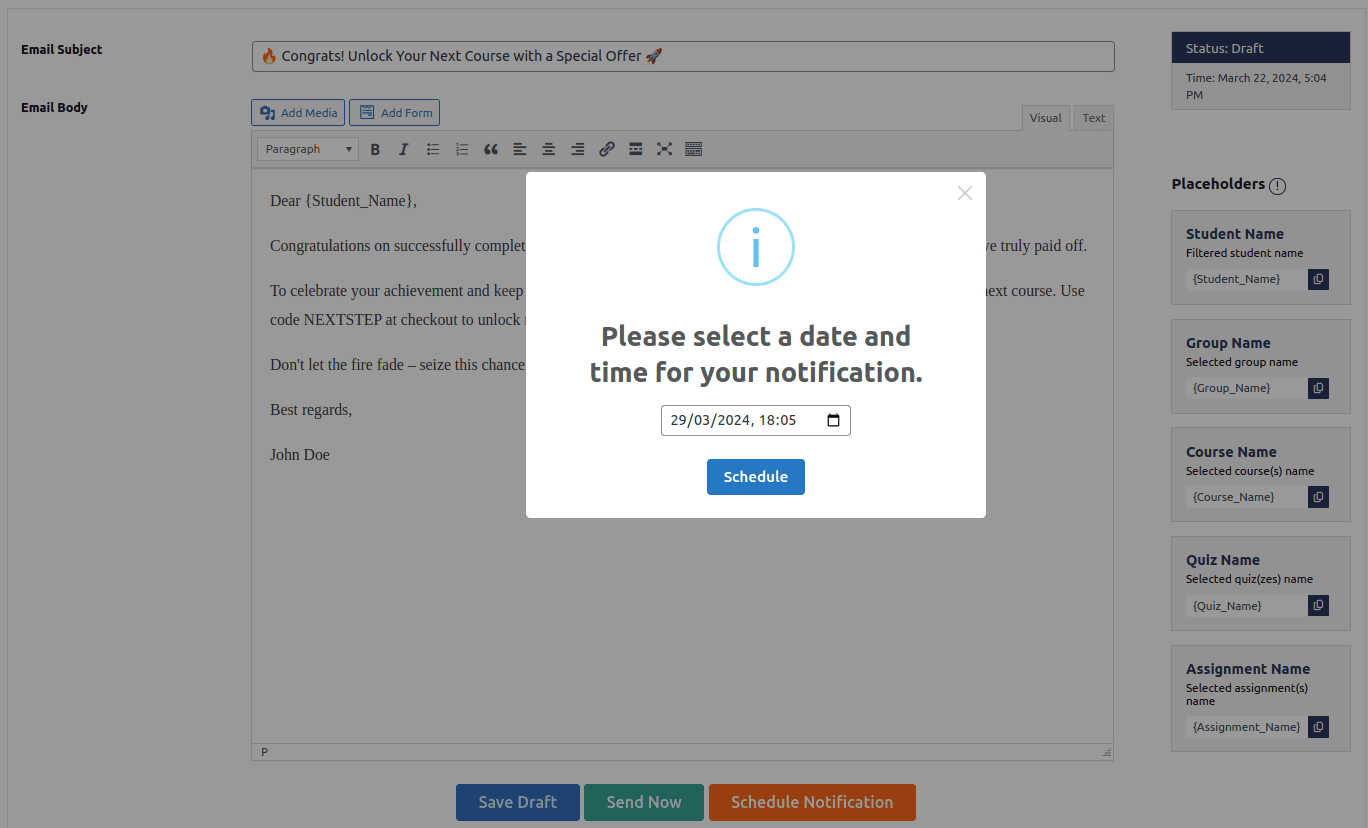
Schedule Email Notification
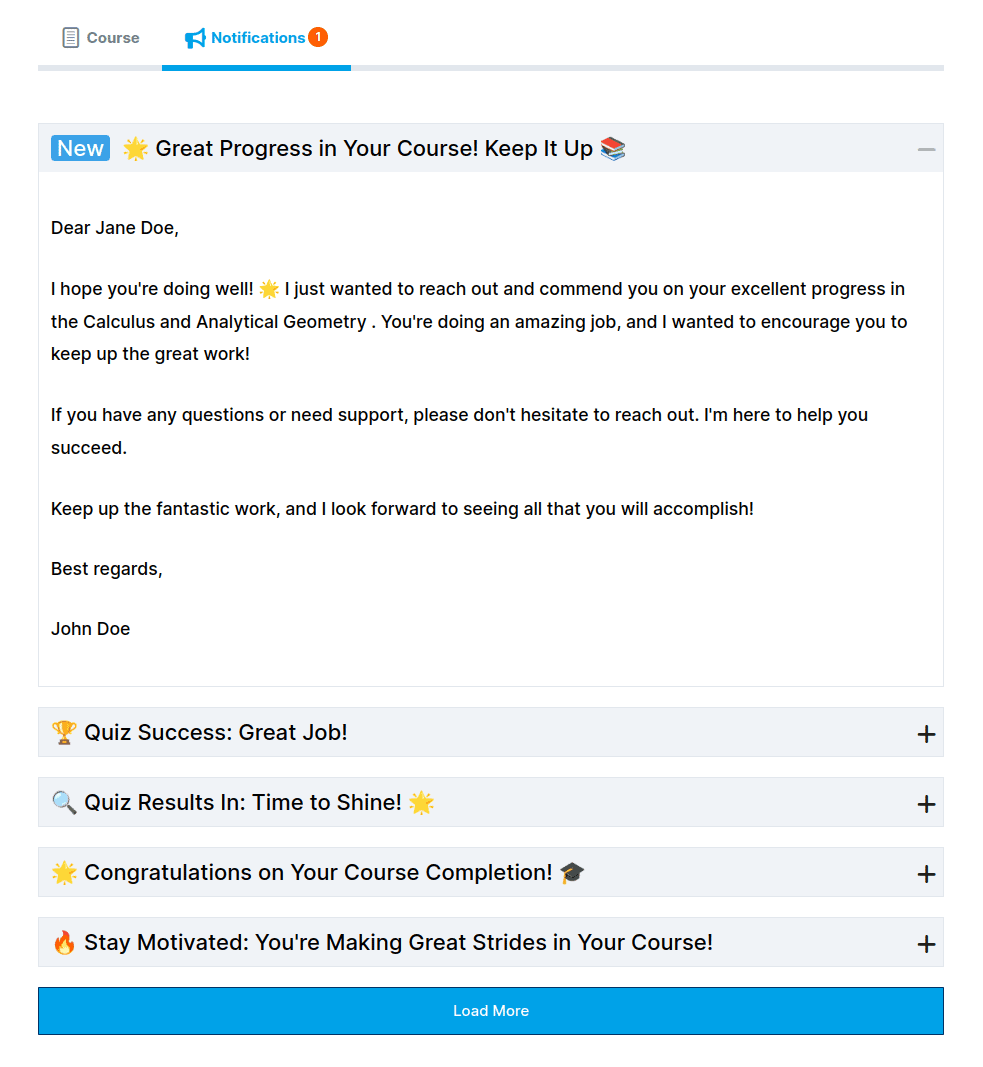
Student Notification Tab on Course Page
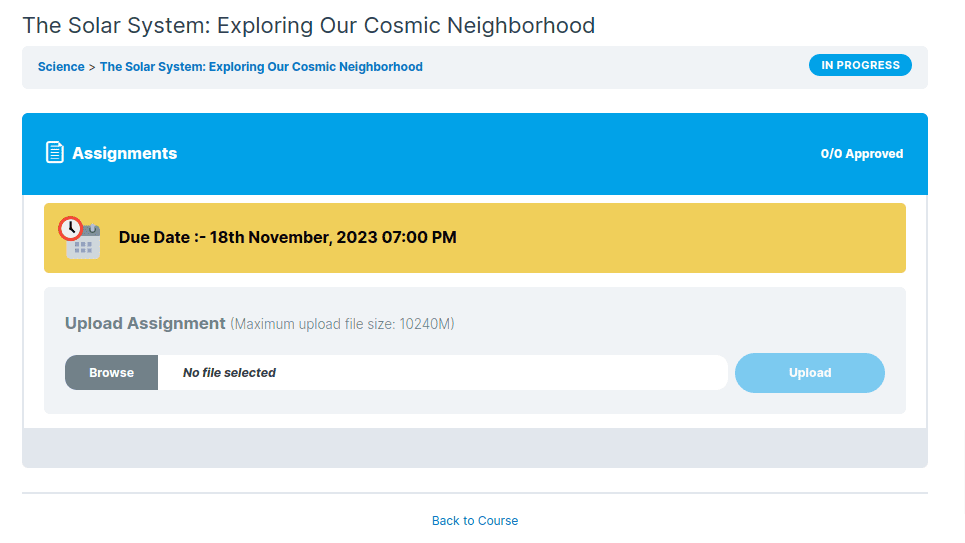
Assignment Deadline
Create Student Notifications from Frontend
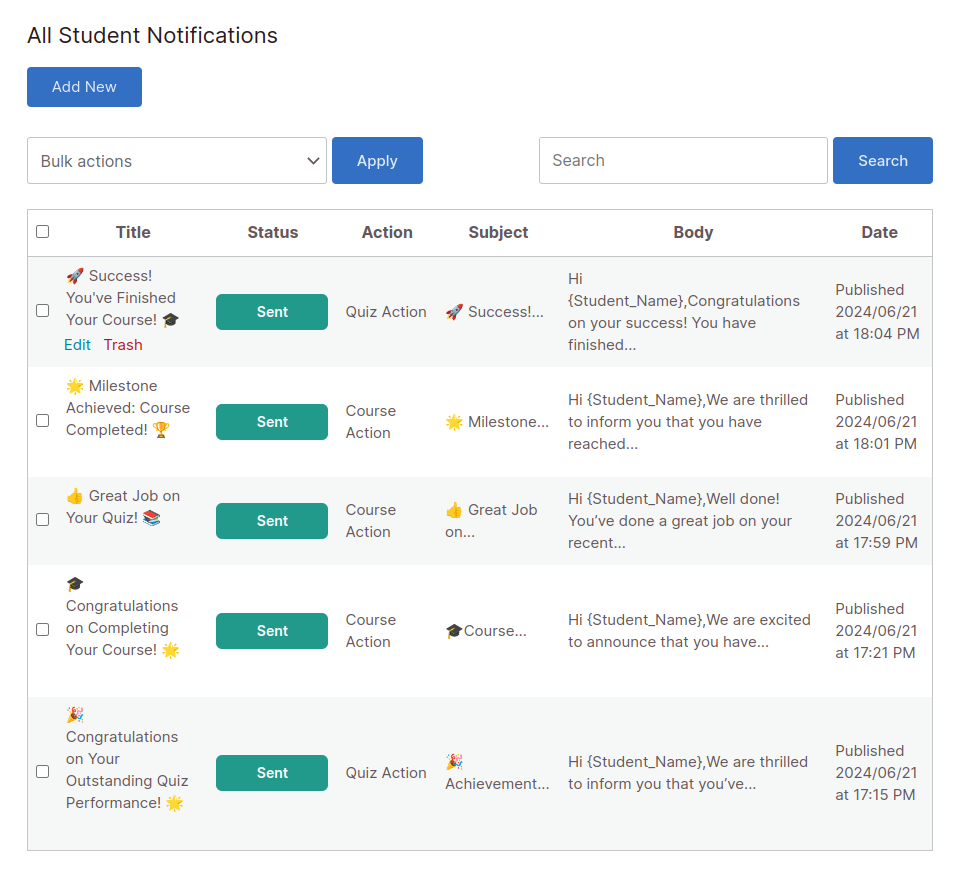
Student Notification Management from Frontend
Documentation & Support
Installation Guide
Explore our guided documentation for a quick and hassle-free experience
Reviews
 Flexible and Detailed Targeting
I was pleasantly surprised by the flexibility of this tool. The filters are incredibly detailed, allowing us to target communication based on quiz scores, assignment statuses, and more. It integrates seamlessly with other LearnDash plugins, which is a huge plus!
Thank you for your feedback.
275 of 547 people found this review helpful.
 Essential Tool for LearnDash
Absolutely essential for anyone managing online courses. The personalized placeholders like {Student_Name} and {Course_Name} make emails feel very tailored and personal. It’s also very user-friendly and reliable.
293 of 563 people found this review helpful.
Help other customers find the most helpful reviews
Did you find this review helpful?
 Game Changer for Course Administration
We’ve been using this plugin for 6 months, and it’s been a game changer in the way we interact with our students. The scheduling feature is particularly useful, allowing us to time our messages perfectly.
296 of 606 people found this review helpful.
Help other customers find the most helpful reviews
Did you find this review helpful?
 Customization and Ease of Use
Great functionality and superb support! This plugin offers the perfect blend of customization and ease of use. The ability to craft custom emails and then see them archived on a course page is a standout feature.
261 of 581 people found this review helpful.
Help other customers find the most helpful reviews
Did you find this review helpful?
 Enhanced Engagement and Communication
This plugin has transformed how I communicate with my students! The ability to send personalized emails based on specific course activities has helped me keep my students engaged and on track. Highly recommended for anyone looking to enhance their course communication!
284 of 596 people found this review helpful.
Help other customers find the most helpful reviews
Did you find this review helpful?